We Built Symmetrium Go for the Deployment That Never Has to Wait

Now Live!

We Built Symmetrium Go for the Deployment That Never Has to Wait

Every BYOD project I’ve watched in the last decade has had the same hidden cost: integration.

The product gets selected. The license gets signed. Then the deployment runs into the customer’s environment, and what was supposed to be six weeks becomes nine months. Identity integrations stall. UEM migrations get scoped. Security teams ask for assessments. By the time the rollout reaches employees, the original business case has eroded,  and half the time, the project quietly stalls before it ever scales.

Symmetrium Go is the version of our platform built for that to never happen.

The thing Go does that a full Platform doesn’t

Symmetrium has been in production for years. Our full platform runs at federal and defense agencies, at regulated enterprises, at customers who need every governance lever a workspace can offer. It works. It’s not the question.

The question is what it takes to deploy a workspace solution at scale, in environments that already have a mature mobility stack, without rebuilding any of it.

That’s what Go is for.

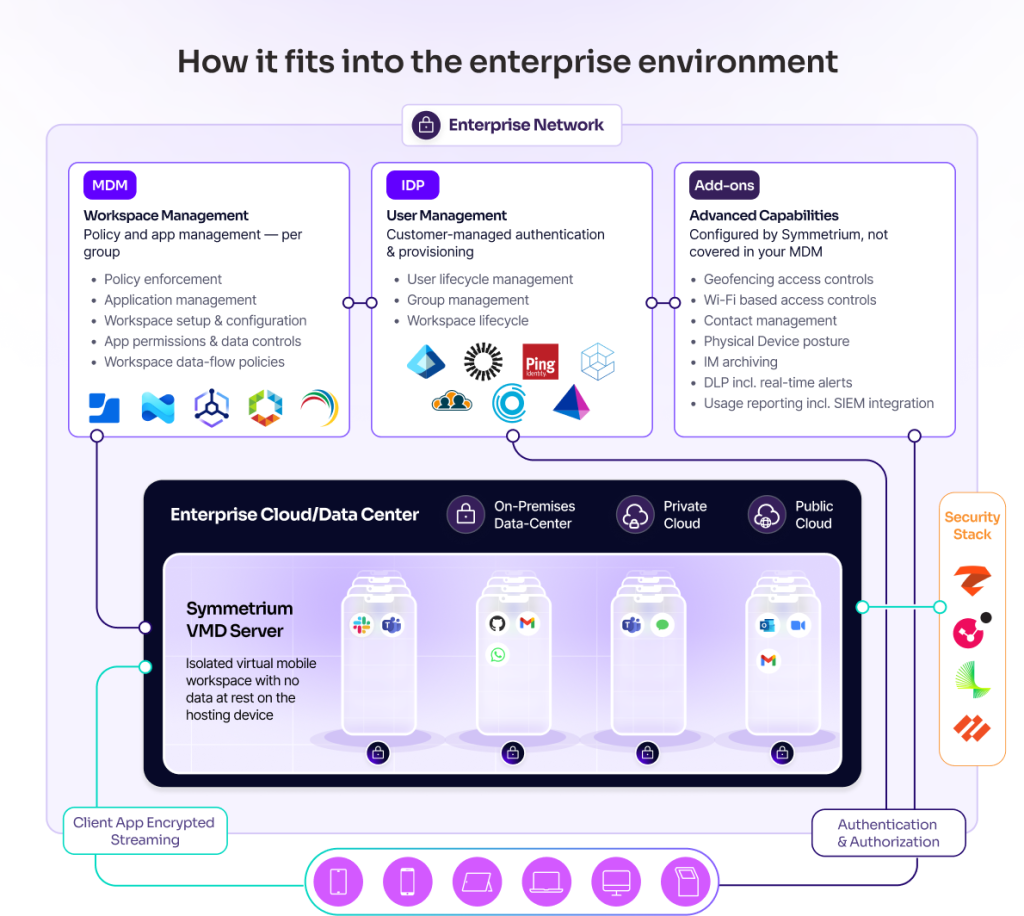
Go runs inside the customer’s existing UEM. Whatever they have: Microsoft Intune, VMware Workspace ONE, Ivanti, anything,  Go fits into it. There is no new management console. There is no parallel admin plane. There is no integration project. The customer’s security and mobility team uses the tools they already operate.

This is the part of the architecture that took us the longest to get right, and it’s why we’re launching Go as a distinct offering rather than as a deployment mode of the platform.

How Go fits in the mobile stack

What “no replacement” actually means

Most BYOD products say they “integrate with your stack.” Then the customer’s IT team runs the proof of concept and discovers what integration actually requires: new identity flows, new policy mappings, new admin training, new agents, new exception handling. The replacement happens quietly, in the seams.

Symmetrium Go doesn’t do that.

The workspace runs on Symmetrium’s infrastructure. The customer’s UEM keeps doing what it does: managing the devices it was already managing, applying the policies it was already applying. Go simply provides a workspace that streams to the device, sitting underneath those existing controls rather than above them.

The customer’s admin team doesn’t learn a new product. They get a new capability inside the product they already run.

That’s a precise architectural commitment, and it’s why deployments that would otherwise take months take hours.

A real deployment, in three hours

A European utility customer with thousands of employees, deployed Symmetrium Go inside their existing Microsoft Intune environment in three hours. Their team did the work. We watched.

Three hours included: connecting Go to the customer’s identity provider, configuring policy mapping inside their Intune environment, and provisioning the first batch of users. By the end of the morning, employees were using the workspace.

This is the kind of deployment our partners (mobile operators, MSPs, system integrators, security practices) need in order to actually scale enterprise BYOD programs. Not a six-month services engagement. Not a custom integration. A turnkey deployment inside the customer’s existing environment.

We didn’t get there by simplifying the product. We got there by being uncompromising about the architecture: the customer’s stack is the customer’s stack, and Go has to work inside it without conditions.

Why this matters for scale

Partners selling enterprise mobility have a recurring problem. Each deployment requires a custom services engagement because each customer environment is different. Margin compresses as integration cost rises. Time-to-revenue stretches. Programs that should reach thousands of employees stall at hundreds because the deployment model doesn’t scale.

Go solves the scale problem at the architectural level. The same deployment shape works across customer environments because Go inherits the customer’s existing stack rather than imposing its own. A partner can run twenty deployments concurrently because each one is fast, repeatable, and doesn’t require a custom integration.

That’s the unlock. The product isn’t different from what we’ve offered before — the scalability of the deployment is.

What’s still in the full platform

Symmetrium Platform is still there. For customers and partners who need a dedicated workspace management console, multi-tenant operator-grade governance, advanced policy tooling, deep operational visibility, and the full set of compliance capabilities, the platform is the right answer. Many of our largest customers are on it. Many of our most demanding regulated deployments require it.

Go is the entry point. It does what most partners need most of the time: deploy a workspace at scale, inside an environment that’s already in place, without an integration project.

Some customers will start with Go and stay there. Some will start with Go and move to the full platform as their program matures. Some will choose the platform from the beginning because their environment requires it. All three paths are valid; the choice is about deployment shape and governance depth, not about product quality.

What we’re asking partners to do

If you’re a partner reading this,  mobile operator, MSP, system integrator, security practice, Go is the SKU we built for you.

It’s deployable. It’s repeatable. It generates recurring revenue per workspace, with an attached enterprise work line, billed through your platform. The commercial model is operator-friendly by design. The deployment model is partner-friendly by design.

The fastest way to evaluate it is to deploy a small pilot inside a real customer environment. We can have one running in days. The pilot will tell you more about the deployment fit than any pitch can.

If you’re a partner who’s been waiting for BYOD to be deployable at the speed your enterprise customers actually need, Go is what we built for that.

📧 partnerships@symmetrium.io 

— Omer

Mobile Operators Have an Untapped Enterprise Revenue Line. We Built It.

There’s a version of enterprise BYOD that actually works. Employees use it willingly. Security teams trust it completely. And every active user generates recurring revenue for the operator who delivers it.

That version exists now. We’re launching it at MWC 2026.

The stuck market

Enterprise mobility has been stuck in the same standoff for years.

Control the device, and employees revolt: adoption stalls, work leaks to WhatsApp, and the IT investment is wasted. 

Don’t control the device, and governance collapses: compliance gaps widen, audits fail, and the CISO is back at square one.

Neither path closes the loop. Traditional mobile security stacks don’t solve this. They just make the tradeoff more expensive.

What’s been missing is a way to separate the problem from the phone entirely.

Work that never touches the device

Symmetrium is a Virtual Mobile Workspace – a fully governed mobile environment streamed to any personal phone, with zero data stored on the device.

It looks and feels like a native phone. Employees get their apps, their communication tools, their work identity. But it all runs on the organization’s infrastructure. Nothing lands on the personal device. No MDM. No enrollment. No agents.

Employees adopt it because their privacy is genuinely protected. Not promised. Protected at the architecture level. Security teams get real governance: audit logs, policy enforcement, compliance by design. And the adoption gap that kills every traditional BYOD program? It closes.

That last part is what makes this interesting for mobile operators.

Adoption is what creates ARPU

Most enterprise security bundles sell controls. Controls that get licensed, partially deployed, and quietly abandoned when employees won’t use them.

Symmetrium sells something employees actually want: a mobile work experience that doesn’t touch their personal life. That’s why adoption happens. And adoption at scale is what turns a BYOD population ( previously impossible to monetize)  into a recurring revenue line.

The model is straightforward:

  • A recurring workspace subscription per active user, billed through your platform
  • A dedicated enterprise work line per workspace for governed calling and messaging
  • Deployment and managed services that attach naturally to enterprise rollouts

Three revenue streams. One product motion. Delivered to an enterprise customer base that’s already struggling with a problem you can now solve.

The entry point is communications

If you’re looking for where to start the conversation with your enterprise accounts, start here: governed communications.

Every regulated organization – financial services, healthcare, government – is sitting on an urgent, unresolved problem. Their people are using WhatsApp, Telegram, and iMessage for business. That communication is ungoverned, unarchived, and in many cases a compliance violation waiting to be discovered.

Symmetrium lets those apps run inside a fully governed workspace. The enterprise work line anchors identity and policy at the operator layer. Archiving, when required, is built in, not bolted on.

And the best part, the UX feedback we’re getting from users is consistent: it feels like their regular phone. All while compliance controls are held throughout. Nothing touches the personal device.

That combination, natural experience and operational-grade governance, is what makes the product stick.

What we’re launching at MWC

At MWC 2026, we’re introducing a packaged offering built specifically for mobile operators – a go-to-market model that lets you bring enterprise-grade BYOD to your accounts with a clear commercial structure and two product tiers designed for different deployment needs.

The operator offering at a glance

Symmetrium GoSymmetrium Platform (MWM)
Best forFast deployment, high adoption, unmanaged devicesEnterprises running multiple workspace programs under one governance layer
DeploymentTurnkey, integrates with existing mobile and identity stackFull enterprise control plane with centralized management console
ComplianceZero data at rest, policy enforcement, auditingAdds archiving, DLP, geo-fencing, device posture, advanced governance
Services attachStandard onboarding and integrationManaged services, ongoing governance operations
Operator revenue modelRecurring workspace subscriptions + enterprise work linesRecurring subscriptions + work lines + managed services revenue

Capability details

For teams evaluating specific features:

Symmetrium PlatformSymmetrium Go
No data at rest
Full Privacy
SIEM integration
Auditing
App & patch management / LOB support
Contact managementAdd-On
Geo-fencingAdd-On
Wifi basedAdd-On
Device postureAdd-On
ArchivingAdd-On
DLPAdd-On

Workspace types: Communication · Data access and capture · Full mobile work · Shared and shift

Access types: BYOD single identity · BYOD multi-identity · Shared device · Corporate-owned fleet

How it deploys

Symmetrium runs across any hosting model – no infrastructure rip-and-replace required.

CloudHybridOn-premises
Management + workspace servers in cloudManagement in cloud, workspace servers on-premManagement + workspace servers fully on-prem

The opportunity is here, right now

Enterprise BYOD has been a problem without a good answer for years. The technology either alienated employees or left security teams exposed. The result was a massive, underserved market sitting in your existing customer base – enterprises that need secure mobile work but have never found a solution they could actually deploy at scale.

Symmetrium closes that gap. And because it’s built to be delivered through an operator’s commercial model – with recurring workspace revenue, enterprise work lines, and services attach – it turns a customer pain point into a new revenue line for you.

The same product works across financial services, healthcare, government, and enterprise BYOD broadly. Same motion, different entry conversations depending on where your accounts are.

We’re at MWC to show you what this looks like mapped to your specific portfolio.

If you’re at MWC, let’s spend 30 minutes on it.

📧 partnerships@symmetrium.io | 🌐 symmetrium.io

Secure Mobile Communication for Government Field Operations: Insights from a Pilot Evaluation

Government field teams depend on fast, discreet mobile communication. Yet the tools they rely on—personal messaging apps, unmanaged devices, and ad-hoc workphones—create unavoidable risk.

To explore a new operational model, a confidential government intelligence agency conducted a controlled pilot with Symmetrium. Their goal: evaluate whether a virtual mobile workspace—fully isolated, zero data at rest, and streamed to any personal phone—could support the realities of high-sensitivity field communication.

What follows is a summary of what was tested and what was learned.

The Operational Challenge: Secure Comms Without Compromising the Operator

For field personnel, mobile communication must feel natural, immediate, and trustworthy. But the operational environment introduces constraints:

  • Personal phones are often the only practical device in field or off-site scenarios.
  • MDM and surveillance agents are unacceptable—both operationally and from a privacy standpoint.
  • Apps like WhatsApp are indispensable, yet ungoverned messaging creates compliance, exposure, and data-leak risks.
  • A clean, separate work identity is needed—without touching or monitoring the personal environment.

The agency sought a model where operatives could use secure, policy-controlled communication without giving up their privacy or compromising their operational safety.

Why Symmetrium: A Separate, Secure Identity for Field Operations

Symmetrium provides a fully isolated work environment streamed from the organization’s infrastructure, with zero data ever stored on the physical device. For high-sensitivity field use, this architecture aligns naturally with operational constraints:

  • No enrollment, no agents, no access to personal data
  • A separate operational identity with full policy enforcement
  • Ability to run apps like WhatsApp, Telegram, Facebook and Instagram inside the workspace with compliance logging
  • Native performance that matches how operatives already communicate

This combination—security, compliance, and natural UX—made it a strong candidate for evaluation.

Inside the Pilot: Testing a Controlled Intelligence Workspace

During the pilot, the agency deployed 10 virtual mobile devices, each providing a secure workspace accessible from a personal phone. The environment included:

  • A dedicated operational WhatsApp number for each workspace
  • Secure messaging with organization-level visibility
  • An isolated workspace streamed from the agency’s server
  • Policy-controlled usage, including DLP features and access enforcement

All configurations aligned with the agency’s internal communication requirements.

How Operatives Used the System: Real-World Behavior at Real Volume

Over the course of the two-month pilot, operatives used the workspace heavily and consistently:

  • 4,435 messages exchanged
  • 986 chat sessions
  • 2,086 system connections
  • 210 average daily usage
  • 68 distinct conversation threads

Usage patterns mirrored everyday mobile behavior—fast exchanges, frequent reconnections, and natural communication flow. According to the pilot’s UX observations, participants reported a familiar, frictionless experience, similar to using their regular device. Support needs were minimal, and all issues were resolved quickly.

Validated Operational Capabilities: Privacy, Control, and Operator Effectiveness

Based on the pilot results, the agency validated several key operational advantages:

  • Sensitive data never touches the physical device—reducing risk during stops, searches, and inspections.
  • The operational identity remains fully separate and centrally controlled.
  • Messaging can be audited and governed without monitoring the personal phone.
  • Policy controls (screenshot, screen recording, copying, exporting) function reliably.
  • Operators retain full, native control over their day-to-day communication—adding contacts naturally and requesting new apps as operational needs evolve.
  • Approved tools and updates can be deployed across all workspaces within seconds, eliminating the back-office delays that typically slow down secure communication changes.
  • Teams can communicate and adapt quickly, without training or workflow disruption.

The pilot demonstrated that government field teams can operate securely on personal devices while maintaining both centralized governance and real-time operational flexibility.

Strategic Impact: A New Model for Government Field Mobility

The successful test of a single operational identity lays the foundation for broader applications across government field operations:

• Single-Identity Workflows: Secure Communications for Field Personnel

Validated during the pilot—ideal for teams operating across locations and departments.

• High-Sensitivity Operations: Separation That Protects the Operator

A secure work identity with zero data at rest and fully revocable access.

• Multi-Identity Operations: The Next Step Forward

While not part of the pilot, Symmetrium’s architecture supports evolving toward multiple isolated profiles and policy sets—important for agencies with complex operational roles.

What’s Next: Scaling Secure Mobility for Government Field Agencies

The agency is now analyzing expansion paths for additional field-focused operational groups. The pilot confirmed that a virtual mobile workspace can offer operations-grade security without compromising how personnel communicate or how field work is carried out.

Symmetrium continues to work with government field agencies to refine this model and support the next generation of secure mobile communication for high-sensitivity operational environments.
Symmetrium gives sensitive teams a secure mobile identity they can trust.
If you’re building capabilities for field, operational, or high-sensitivity teams, we’re here to help you evaluate whether this model is the right fit for your environment.
Reach out >>

How to Achieve a Fully Secure Mobile Workspace for Remote Teams

The mobile workforce is no longer an edge case, it’s the default. From healthcare professionals moving between sites to consultants checking messages on the go, mobile devices are now central to how business gets done. But they’re also central to how data gets lost.

Most organizations are still trying to secure mobile work the way they secured laptops in the early 2010s:  layering control tools on top of each other: MDM for governance, MTD for threats, VPNs for access, browser wrappers for isolation. The result? A stack that’s difficult to manage, frustrating to use, and still leaves data at risk.

Symmetrium offers a different approach: a secure mobile workspace that delivers zero-trust access, full compliance, and native mobile performance, without installing anything on the device or touching personal data. It’s called a Virtual Mobile Workspace (VMW), and it changes the equation for mobile security.

The hidden cost of managing devices

Enterprise mobile security stacks are often made up of overlapping tools:

  • Mobile Device Management (MDM) for control and compliance
  • Mobile Threat Defense (MTD) or EDR for endpoint monitoring
  • VPNs or ZTNA for secure connectivity
  • Remote Browser Isolation (RBI) to limit web-based threats

Each of these tools adds friction – to users, to IT, and to overall risk management. Admins are left juggling enrollment flows, configuration rules, and personal privacy boundaries. Meanwhile, employees resist tools that inspect their personal apps and behavior. And even with all this overhead, security gaps persist.

Workspace isolation, not device control

A fully secure mobile workspace doesn’t start with the device. It starts with a clean separation of work and personal environments, enforced by design, not policy workarounds.

Symmetrium’s Virtual Mobile Workspace (VMW) is streamed securely from the enterprise cloud or data center to any mobile device. It behaves like a native mobile OS, but lives entirely off the device, with:

  • Zero data at rest
  • No device enrollment or MDM
  • No agents or app wrapping
  • Full enterprise visibility and control

Users access their work environment through a low-latency stream. The mobile experience feels familiar: camera, calls, messaging all supported – but everything stays contained within the workspace. Personal apps remain untouched, and IT teams never see or control the personal side of the device.

Learn how Symmetrium compares to MAM approaches

Why MAM and browser isolation ≠ mobile-native workspace

Mobile Application Management (MAM) and browser isolation are often positioned as lightweight alternatives to full MDM. But neither approach delivers the functionality, compliance assurance, or user experience of a true mobile workspace.

CapabilityMAMBrowser Isolation (RBI)Symmetrium Virtual Mobile Workspace
Native mobile experiencePartial per-appWeb-onlyFull OS-level mobile UI
Data-at-rest riskApp data storedNoneZero data at rest
App & feature supportWrapping requiredLimitedFull mobile app support
Work-life separationApp scope onlyNoneWorkspace-level isolation
BYOD user privacyPersonal device inspectionBrowser-onlyNo enrollment, full privacy
Compliance enforcementPer-app rulesLimited loggingAudit-ready policy control

Symmetrium’s approach enables full separation of work and personal environments, with centralized policy enforcement and native mobile UX, all without installing anything on the device.

Control, compliance, and privacy – built in

A secure mobile workspace isn’t a tradeoff between IT control and user privacy. It’s a way to achieve both at once. Symmetrium brings everything together into one managed, isolated environment.

Security & Compliance

  • Data never touches the endpoint
  • Mobile DLP blocks screenshots, copy/paste, recordings
  • Messaging archiving and workspace-dedicated phone numbers
  • Built-in web filtering and audit logging

Learn more about Zero Trust standards

IT Management

  • No need for MDM enrollment or setup flows
  • Works across Android and iOS with centralized control
  • Remote app deployment and workspace patching
  • Supports conditional access and IDP integration

User Experience

  • Native mobile interface through low-latency encrypted streaming
  • Native mobile access to camera, calling, keyboard 
  • Clean separation between work and personal data
  • No device control, no user resistance

Where secure mobile workspaces shine

Symmetrium’s Virtual Mobile Workspace is especially well-suited for:

BYOD environments

Symmetrium supports secure mobile access on any personal device, without enrollment, surveillance, or intrusive agents. Users maintain privacy. IT maintains control.

Shared devices in high-turnover industries

In healthcare, logistics, or field work, shared mobile devices create complexity. With VMWs, employees can access their personalized workspaces from any device, with no need for kiosk mode or reconfiguration.

Third-party access

Contractors, advisors, and partners can be granted secure mobile access in minutes. There’s no setup, no teardown, and no risk of data lingering on the device.

Explore mobile workforce management use cases

Symmetrium’s model supports compliance with global frameworks such as GDPR and the HIPAA Security Rule by enforcing isolation, logging, and data minimization by default.

Simplifying the stack, without compromise

Instead of adding to the stack, Symmetrium simplifies it:

  • No MDM to configure
  • No VPN tunnel to maintain
  • No browser wrappers or virtual desktop infrastructure
  • No endpoint threat agents

Everything work-related: apps, messaging, data, policies – lives inside the workspace.

This not only reduces IT overhead, but also creates consistency across all device types and user scenarios.

Read: MDM vs. MAM – Everything You Need to Know

Best practices for mobile-secure remote teams

If you’re managing a remote or hybrid mobile workforce, here are four key principles to implement:

  • Stream the workspace instead of storing data on the device
  • Enforce policy inside the workspace, not at the OS level
  • Avoid agents and device inspection to preserve user trust and simplify BYOD
  • Standardize your approach across personal and corporate-owned devices

See our mobile security best practices

FAQs

How can remote teams ensure compliance with global data protection laws?
Virtual Mobile Workspaces allow you to contain all business activity in a controlled, isolated environment, with no data stored on the device.

What are some cost-effective mobile security solutions for small businesses?
Symmetrium eliminates the need for multiple tools like MDM, VPN, or EDR, reducing cost and complexity while improving compliance.

How do I educate non-technical staff about mobile cybersecurity risks?
Instead of relying on training alone, you can remove the risk altogether by separating work and personal activity using a secure workspace.

Which remote collaboration tools are most secure for mobile devices?
The most secure approach is to run all collaboration tools, messaging, file sharing, video calls, inside a centrally managed workspace.

How does geolocation impact mobile workspace security?
You can apply location-based policies (via conditional access) to manage who can access the workspace, when, and from where.

What should a remote incident response plan include for mobile threats?
With workspace streaming, containment is simple: revoke access, lock the session, and review audit logs, all without touching the device.

Mobile work deserves real workspaces. Not patchwork tools. 

Symmetrium is redefining how mobile work is secured, without compromising privacy, performance, or compliance. With Virtual Mobile Workspaces, your data stays off the device, your users stay productive, and your IT team stays in control.

Whether you’re supporting a BYOD program, enabling secure field operations, or managing sensitive communications across mobile endpoints, this is how secure mobile work gets done.

👉 Book a live 20 min demo   
👉 Explore our self-serve demo hub

Best Practices for Mobile Data Protection in 2025

Mobile workforces demand modern data protection

As enterprises lean further into mobility, data increasingly lives and moves across smartphones, tablets, and hybrid endpoints. While these devices unlock convenience and agility, they also widen the attack surface. From real-time messaging to app-based workspaces, sensitive corporate information is flowing through mobile endpoints with limited oversight.

But traditional security methods aren’t keeping pace. Cloud backups, rogue apps, and personal-device behavior bypass outdated MDMs and fragmented agent-based approaches. Meanwhile, regulatory pressure around mobile data privacy is intensifying. In the U.S., state-level regulations around mobile privacy are multiplying, while international frameworks like GDPR and the upcoming EU AI Act are reshaping compliance expectations.

The solution isn’t more monitoring. It’s more control. Symmetrium introduces a data-first approach to mobile data protection: one that isolates sensitive data inside a secure, ephemeral workspace. No data at rest. No personal-device compromise. Total enterprise control.

The hidden risks driving modern mobile data protection

Business-critical data now flows through mobile apps, chat threads, and downloaded attachments. Whether it’s healthcare PHI, financial reports, or authentication credentials, mobile endpoints expose high-value information in everyday use.

Yet organizations often overlook how easily data can leak: screenshots, copy/paste, unsanctioned backups, and app permissions create exposure far beyond malware. Personal devices increasingly mix with corporate access, creating invisible risks that are hard to track or audit.

Outdated operating systems, cloud syncing, and public Wi-Fi all add to the vulnerabilities. These risks are especially concerning in industries with sensitive and regulated data, where mobile data exposure can carry legal and financial consequences.

Read industry analysis on mobile device security

What types of mobile data are at risk?

Mobile risks aren’t limited to downloaded files. Data can live in transient spaces:

  • Authentication data: tokens, cookies, access credentials stored by apps or browsers. These are often cached in autofill systems and can be harvested through phishing or compromised apps.
  • Cloud-based attachments: PDFs, signed docs, contracts, spreadsheets. These files can be synced across services or left accessible via file managers.
  • Business communications: chat logs, voice recordings, calendar entries. Messaging apps and collaboration tools may store sensitive information temporarily or indefinitely.
  • Personal-enterprise mix: cross-contamination between personal and corporate apps. For example, sharing files via personal cloud apps or using the same messaging platform for both contexts.
  • Shadow data: cloud-synced versions stored outside enterprise control. Often the result of third-party integrations or automatic backups.

Even with MDMs or mobile encryption in place, these categories remain exposed. App-level DLP can’t stop screenshots or clipboard actions. Mobile data protection requires visibility and control inside the workspace itself.

See our mobile security best practices

Identifying current threats to mobile data

Recent research indicates that over half of mobile devices in use globally operate on outdated or unsupported systems, exposing them to critical vulnerabilities. Additional mobile security reports outline the key risk factors:

  • App-layer leakage: Sideloaded or vulnerable apps accessing sensitive content. Many apps over-request permissions and access content they shouldn’t.
  • Backup risks: Unencrypted auto-sync to iCloud, Google Drive, or other cloud storage. This can inadvertently expose sensitive documents outside the enterprise.
  • Outdated OSs: Unsupported devices that can’t receive security patches. These devices are prime targets for attackers.
  • Human behavior: Screenshots, file exports, unauthorized app usage. These actions often bypass enterprise controls entirely.
  • Lack of visibility: No unified audit trail or policy enforcement. Without proper logging, risky behavior often goes undetected.

The problem is compounded by remote and hybrid work environments, where devices are more likely to be unmanaged, shared, or out of compliance.

These risks aren’t solved by more endpoint agents or heavier device control. Instead, they call for a workspace-level solution: one that governs mobile activity without touching the personal OS.

Explore 2025 Global Threat Report by Zimperium

Best practices for mobile data protection

To truly protect mobile data, organizations must shift from reactive defense to proactive containment. Here are 2025’s best practices:

Data isolation
Eliminate data at rest by delivering content inside a Virtual Mobile Workspace (VMW) with no persistence on the local device. No local storage = no lateral exposure. This ensures that even if a device is lost, stolen, or compromised, enterprise data cannot be extracted.

Access control
Enforce granular policies within the workspace: block copy/paste, screenshots, and screen recording. Apply device-agnostic controls tied to identity and workspace state. This enables adaptive risk mitigation regardless of device ownership or operating system.

Compliance & audit
Log every workspace session and action. Assign enterprise-level identities and phone numbers. Provide export-ready audit trails. This simplifies regulatory reporting and internal investigations.

User privacy
Avoid MDMs, agents, or surveillance of personal environments. Symmetrium protects business data without touching the personal OS, ideal for BYOD and shared-device settings.

Dynamic session policies
Adjust access and policy enforcement in real-time based on contextual signals: device posture, location, time of day, and more. This ensures that the workspace responds to risk as it evolves.

Learn how Symmetrium transforms mobile DLP
Read Gartner Peer Insights on Mobile Data Protection Solutions

FAQs: What leaders are asking about mobile data protection

Can mobile data protection solutions help businesses achieve regulatory compliance?
Yes. By isolating sensitive data, logging user actions, and enforcing usage policies, workspace-first solutions like Symmetrium support HIPAA, GDPR, and other mandates.

How does cloud backup impact the security of my mobile data?
If data is stored locally, it may be synced to personal or unmanaged clouds. Eliminating local data through VMW ensures nothing can leak via cloud sync.

Should businesses allow personal devices to access corporate data?
Yes, with VMW, IT controls data flow without compromising privacy.

What role does artificial intelligence play in mobile data security?
AI can aid threat detection, but true protection requires hard boundaries: controlling where data lives, how it’s used, and what actions are allowed.

Are there specific threats unique to wearable devices?
Yes. From Bluetooth sync to ambient recording and sensor leakage, wearables introduce new access vectors. Symmetrium’s workspace boundaries mitigate that risk.

How can IT enforce mobile privacy without overstepping?
Workspace isolation ensures full control over enterprise data without monitoring or interfering with the personal environment—preserving trust and usability.

Can mobile data protection improve user experience?
Yes. By avoiding invasive controls and streamlining access through a unified workspace, users benefit from speed, consistency, and clarity.

Conclusion: Redefining mobile data protection in 2025

Protecting mobile data in 2025 means preventing exposure—not just detecting threats. That requires containing enterprise data inside a secure, controlled workspace, not on personal devices.

Symmetrium’s Virtual Mobile Workspace provides the foundation: zero data at rest, full compliance, and policy enforcement by design. It’s the mobile data protection solution built for the privacy-first, regulation-ready, hybrid workforce.

As mobile-first becomes the enterprise norm, mobile data protection must evolve from traditional control tactics to strategic containment. Virtual Mobile Workspaces are not just a security tool—they’re the new perimeter.

👉 Book a live 20 min demo   
👉 Explore our self-serve demo hub

Mobile Vulnerability Management: Protecting Your Data in a BYOD World

Mobile is now the front line of enterprise access. And BYOD isn’t optional. It’s the norm.

But when personal devices mix with corporate data, traditional controls start to break. Tools built for desktop management struggle with mobility, privacy, and fragmented ownership. Risk grows, while user trust shrinks.

To manage the sprawl, organizations turn to Mobile Vulnerability Management (MVM). It’s a set of practices and tools designed to secure mobile endpoints, detect threats, and prevent data loss, especially in BYOD settings.

But most MVM strategies still focus on locking down the device. That approach can add friction without solving the core problem: data exposure.

A better model flips the equation. What if the safest mobile device is one that never holds your data at all?

What Is Mobile Vulnerability Management?

Mobile Vulnerability Management (MVM) is the practice of identifying, assessing, and reducing security risks across mobile endpoints. Its core goal is to protect corporate data accessed through mobile devices, regardless of who owns them.

A strong MVM strategy covers several areas: device posture (such as OS version and configuration), threat detection, data loss prevention, and compliance with industry standards. It helps organizations ensure that mobile access remains secure without compromising productivity.

This becomes especially important in BYOD environments. Personal devices vary widely in their security posture, usage patterns, and update status. IT teams often have limited visibility and control, and users are sensitive to invasive policies that affect personal apps or data.

Traditional solutions like MDM, MAM, and DLP can help, but they often struggle to balance control, usability, and privacy. As mobile risk continues to evolve, organizations are beginning to explore alternative models that focus more on securing access and data itself, rather than the entire device.

Key Mobile Device Vulnerabilities to Watch

Most mobile vulnerabilities can be traced back to one outcome: sensitive data leaving the organization’s control. Whether through storage, transmission, or user behavior, these are the main paths to mobile data exposure.

Data stored on the device

 Apps often cache data locally, and some store files in unencrypted locations. Devices without full-disk encryption or strong screen locks are especially vulnerable. If a phone is lost, stolen, or compromised, stored business data can be accessed directly.

Data in transit over unsafe networks

 When users connect to public or rogue WiFi networks, attackers can intercept traffic using man-in-the-middle attacks. If app traffic isn’t properly encrypted or tunneled through a secure channel, login credentials, internal documents, and session tokens may be exposed.

Data shared beyond corporate boundaries

 Even with secure apps, users can leak data by copying content into personal apps, capturing screenshots, or syncing files to unapproved cloud storage. These actions are difficult to monitor, especially on BYOD devices with mixed work and personal usage.

Data accessed by unauthorized users

 Weak passwords, shared devices, or permissive app permissions can open the door to unauthorized access. When a user installs high-risk apps or loses a device without remote lock capabilities, business data is at immediate risk.

Each of these paths highlights a core challenge of mobile security: the data itself is often the most vulnerable asset. MVM strategies must be designed to limit how data is stored, transmitted, and accessed, not just how the device behaves.

Best Practices for Device Vulnerability Management

Protecting mobile devices isn’t just about patching systems or locking down features. In BYOD environments, where control is limited and personal privacy matters, effective device vulnerability management depends on strategy, not surveillance.

Minimize data exposure

Assume every mobile device is at risk and reduce the amount of sensitive data it ever touches. The less data on the device, the smaller the attack surface.

Trust sessions, not devices

Inconsistent hardware, unverified configurations, and personal use make devices unreliable trust anchors. Prioritize access control based on user identity, context, and real-time posture, not device ownership.

Contain, don’t surveil

Heavy monitoring or intrusive policies can backfire in BYOD scenarios. Instead of chasing risky behavior, isolate work activity in controlled environments where corporate data is naturally separated from personal use.

Stream, don’t store

Where possible, eliminate local storage altogether. Stream data to the device during active sessions, and revoke access when the session ends. This removes the need for encryption, wiping, or app-level restrictions.

Build for privacy, not control

A privacy-first approach increases adoption and reduces friction. Users are more likely to cooperate when they know their personal data stays private and untouchable.

These principles shift the focus of mobile device vulnerability management away from micromanaging devices and toward designing systems that make data exposure unlikely by default.

Tools for Mobile Vulnerability Management

An effective strategy for vulnerability management for mobile devices is built on a set of complementary tools. Each focuses on a different part of the risk surface, from device control to data protection and access management. The key is understanding where each tool fits, and where new approaches may be needed, especially in BYOD environments.

Mobile Device Management (MDM) and Mobile Application Management (MAM)

These tools allow IT to enforce policies, manage apps, and remotely wipe lost or non-compliant devices. MDM is widely used for corporate-owned devices, while MAM helps secure individual apps on personal phones. Both can be effective, but their adoption in BYOD settings is often limited by privacy and user control concerns.

Mobile Threat Defense (MTD)

MTD platforms help detect malware, assess device posture, and flag suspicious behavior. They add an important detection layer, especially when paired with conditional access policies. Their success depends on user adoption and platform compatibility.

Data Loss Prevention (DLP)

DLP tools monitor and restrict how data moves: blocking unauthorized file transfers, cloud syncs, or clipboard activity. These are useful safeguards but work best when paired with broader containment strategies.

Identity and Access Management (IAM/SSO)

IAM solutions authenticate users, enforce multi-factor access, and manage roles across platforms. They’re essential for verifying who’s accessing what, but they don’t secure the session or control what happens after access is granted.

All of these tools play a role in managing mobile risk. When combined thoughtfully, they can form a solid foundation for identifying threats, enforcing policy, and maintaining compliance. But in BYOD environments, especially where data protection is the priority, traditional tools often act after the fact. This has led to newer approaches that aim to prevent data exposure entirely, rather than contain it after it occurs.

A Modern Alternative: Rethinking Mobile Data Protection

One way to reduce mobile risk is to detect and respond quickly. Another is to prevent data from being exposed in the first place. Symmetrium takes the second route. Its Virtual Mobile Device (VMD) model keeps data inside a secure environment and streams access to mobile devices without ever storing information locally. This shifts control from the device itself to the session, making it easier to manage security without touching the user’s personal space.

Designed for BYOD from the start, the VMD approach removes the need for remote wipe, local encryption, app sandboxing, or VPN enforcement. There’s nothing to install, no personal data to monitor, and no data at rest to protect. It works alongside existing IAM platforms and can be extended with posture checks or compliance tools as needed.

By eliminating common sources of friction, this model supports a more balanced mobile security strategy. It doesn’t replace every tool in the stack, but it removes the need for many of the controls that are hardest to enforce, especially when devices are personally owned.

How to Build a Mobile Device Vulnerability Program

Mobile vulnerability management isn’t just about assembling tools. It’s about designing a system that aligns with how people actually work, especially in BYOD environments. Whether you follow a traditional stack or rethink the architecture entirely, the goal remains the same: protect sensitive data without blocking productivity.

The traditional stack often begins with tools like MDM and MAM for control, DLP to manage data movement, MTD for threat detection, and IAM for access governance. This setup is posture- and policy-heavy, with multiple systems working together to reduce risk. It works best on corporate-managed devices, but tends to be complex and less effective when users bring their own.

A more modern approach starts by changing the foundation. Instead of securing each device, secure the session. With Symmetrium, you begin with the principle of no data at rest: corporate data never lands on the physical device. It’s streamed securely through a Virtual Mobile Device (VMD) that lives on company-managed infrastructure.

Key steps in this architecture-led model:

  • Start with identity and role-based access, integrating with your existing IdP (SSO, MFA, etc.)
  • Eliminate device trust by containing all work activity within the VMD environment
  • Avoid intrusive device policies—privacy is preserved by design
  • Layer in posture context if needed, but only as a complement
  • Leverage built-in logging and audit trails for compliance and incident response

This model reduces risk without increasing user friction. It’s built for BYOD, without sacrificing visibility or control.

The Future of Mobile Data Protection Starts with Zero Data at Rest

Most MVM tools react after the fact. Symmetrium prevents the risk altogether—by keeping data off the device and securing access at the session level.

In a BYOD world, that’s not just smart. It’s essential.

See what zero data at rest looks like in action. Book a demo.

Frequently Asked Questions

How often should organizations scan mobile devices for vulnerabilities?

At minimum, scan devices during onboarding and at regular intervals, like monthly or quarterly. In high-risk environments or with BYOD, continuous or session-based posture checks are more effective.

What role does user behavior play in mobile vulnerability exposure?

A major one. Actions like connecting to public WiFi, installing risky apps, or copying data outside work apps can bypass controls. Smart architecture helps reduce reliance on perfect user behavior.

Are corporate-managed and BYOD devices equally vulnerable?

No. BYOD devices pose more risk due to inconsistent controls, limited visibility, and mixed personal use. That’s why modern models focus on securing access, not the device.

How do mobile OS updates impact vulnerability management strategies?

OS updates often patch critical security flaws, but delays in user updates can leave devices exposed. Strategies should minimize reliance on OS version by securing sessions and data flow directly.

Can mobile vulnerability management be integrated with existing SIEM or SOC tools?

Yes. Solutions like Symmetrium provide detailed logs and alerts that can feed into SIEM/SOC platforms, ensuring mobile sessions are part of broader threat detection and compliance workflows.

Remote Work Security Checklist: Protect Your Enterprise from Modern Cyber Risks

Remote work is no longer a temporary shift. It is the operating model for modern enterprises. Teams are distributed. Devices are varied. Work happens anywhere. Yet many security strategies still rely on outdated tools like VPNs, agents, or mobile device management, which slow people down and leave gaps open.

The problem is not just about protecting endpoints. It is about securing the work itself. Data should never leave the organization’s control, no matter where users are or what device they use. That means moving away from device-first thinking and toward a model built for how work actually happens today.

This checklist will walk you through remote work security best practices. It focuses on protecting enterprise data without compromising productivity, privacy, or compliance. Because securing work should be seamless, not stressful.

Why Remote Work Security Matters in 2025

Remote work is no longer a trend. It is an expectation. Enterprises now support a global, mobile workforce that demands flexibility across devices, schedules, and locations. But that flexibility introduces a wide range of new risks. Enterprise data moves constantly, often across personal devices and unmanaged networks. Security teams are expected to maintain control without slowing the business down.

Compliance pressure is also rising. Regulations like HIPAA, GDPR, and the SEC’s cybersecurity rules apply to any device or channel used for business. If employees are using personal phones for messaging, file access, or mobile apps, every one of those actions needs to be auditable, protected, and compliant.

Most traditional tools were built for a different reality. Mobile device management and VPNs add friction. They create privacy concerns. They are difficult to scale. In many cases, they are not even used because employees avoid them.

The real challenge is delivering the best security practices for working remotely in a way that aligns with how people actually work. That means protecting the workspace, not the device. It means enforcing compliance and access control without requiring full control over personal hardware. In 2025, remote work security must be invisible to the user, but fully visible to the enterprise.

Key Risks in Securing a Remote Workforce

Enterprises today face a growing set of risks when supporting remote teams. These risks are not just more common; they are more complex, more distributed, and harder to see.

The most obvious threat is data leakage. Sensitive business information now travels across mobile messaging apps, personal email, and unsecured downloads. Screenshots and screen recordings can silently exfiltrate data without triggering any alerts. Traditional endpoint controls often miss these behaviors entirely, especially when it comes to remote access vulnerabilities created by unmanaged devices and insecure networks.

Shadow IT compounds the problem. As workers look for faster ways to get things done, they turn to unapproved tools and unsanctioned channels. Business ends up happening outside the organization’s security envelope, beyond IT’s ability to monitor or enforce policy.

Credential theft remains a top attack vector. Remote workers often use unmanaged devices with weak protection. A single phishing attempt can compromise an account, giving attackers lateral access to sensitive systems.

Then there is compliance. Many organizations struggle to maintain full visibility over mobile work activity. Audit gaps, unarchived conversations, and limited logging create blind spots that regulators will not overlook.

Finally, there is the usability gap. Employees reject slow, invasive, or unreliable security tools. When systems are too hard to use, people find workarounds. That introduces new vulnerabilities, even when policies appear to be in place.

Many enterprises still turn to mobile device management to contain these risks. But even the best mdm cyber security benefits fall short when users are working across personal devices or moving between unmanaged networks. What’s needed is not tighter control over the device, but stronger isolation at the workspace level. When the work environment is secure by design, risk stays contained, no matter what device is used.

Remote Work Security Checklist for Enterprises

To maintain a secure remote workforce requires more than patchwork tools. It calls for a clear, actionable framework that meets real-world conditions: diverse devices, shifting locations, and strict compliance requirements. This checklist outlines the capabilities every enterprise should expect from its remote security strategy.

Keep data off devices entirely

Work should never live on the device. When nothing is stored locally, there is nothing to steal, corrupt, or leak. This single principle drastically reduces the risk of data loss from theft, loss, or malware.

Use encrypted workspace streaming

Sessions should exist only in memory, streamed securely and terminated instantly. Encrypted delivery ensures that each interaction is transient, tamper-resistant, and immune to interception.

Support BYOD without friction

Employees want to use their own phones. Security should not require enrollment, installation, or intrusive monitoring. A secure workspace must run independently of the host device, offering full protection without touching the personal layer.

Deliver a native mobile experience

If the workspace is sluggish or stripped down, users will abandon it. Secure access must support everything mobile users expect—camera, audio, video, keyboard, and full app performance—without compromise.

Enforce isolation for messaging and apps

Uncontrolled communication channels are a major risk. Secure messaging, email, and app activity should take place inside a separate, managed environment. This prevents leakage through services like WhatsApp or unauthorized file sharing platforms.

Provide fine-grained policy controls

Every role, device, and app should follow its own rules. Admins must be able to define access at a granular level, from time of day to app-specific behavior, and adjust dynamically as needs evolve.

Maintain full visibility and auditing

Security is not complete without traceability. Full session logs, messaging archives, and event-level histories allow for fast investigations, compliance readiness, and real-time oversight.

Allow for shared device usage

In healthcare and other shift-based environments, workers rotate but devices stay in place. A secure workspace should let users log in to their own environment instantly, without manual reconfiguration or added risk.

Enable centralized management

IT should be able to control everything from a single dashboard: apps, users, alerts, updates, and permissions. The best remote mobile device management tools integrate this control directly into the secure workspace layer, eliminating redundant systems.

Make compliance the default

HIPAA, GDPR, and internal standards should not require manual enforcement. Compliance must be embedded into the system itself, covering communications, data handling, and access policies.

This checklist reflects the security model remote work demands today. These requirements are best met through a workspace-level approach, where isolation, policy enforcement, and usability are built into the environment itself, not layered on top of the device.

Common Remote Workforce Security Challenges

Even with the right intentions and tools, securing a remote workforce is not simple. Many organizations run into the same problems, often driven by the limits of legacy architectures and user expectations that continue to evolve.

The cost of stacking multiple solutions is one of the first barriers. MDM, VPN, endpoint protection, and app-specific tools often overlap or conflict. Licensing, deployment, and support create significant overhead, both financial and operational.

User resistance is another persistent issue. When tools slow people down or invade their privacy, they look for workarounds. That might mean bypassing the VPN, using personal messaging apps, or ignoring device enrollment requests. Each of these decisions creates new blind spots.

Onboarding adds pressure. Contractors and new hires often need fast access, especially in dynamic teams or short-term projects. Complex setup processes or delays in provisioning slow everything down and put extra strain on IT teams.

Coverage gaps are also common. Security tools built for desktops or corporate laptops often miss activity on mobile apps, messaging platforms, or personal devices. These blind spots leave compliance teams exposed and prevent a full understanding of user behavior.

Finally, there is the issue of shared devices. In healthcare, logistics, and field operations, devices are passed between workers throughout the day. Reconfiguring policies for each user is impractical, and failing to do so risks exposing sensitive data.

These remote workforce security challenges do not disappear with more tools. They require a shift in where and how security is applied. Symmetrium addresses them by isolating the workspace itself. It keeps work data and activity in a controlled environment, separate from the device, and managed centrally. That approach reduces cost, simplifies management, and protects both the business and the user.

Best Practices for Creating a Secure Remote Work Environment

Securing remote work should not mean securing every device. That model is hard to scale, difficult to manage, and often creates more problems than it solves. A stronger approach is to secure the workspace itself. This shifts control to the environment where work happens, not the hardware it runs on.

A virtual mobile workspace creates this separation. It is streamed from infrastructure controlled by the enterprise and inherits all relevant security policies automatically. There is no data stored on the device. Each session is isolated, ephemeral, and protected by encryption from end to end.

This approach also removes friction. The workspace should behave like any other native mobile experience, with support for voice calls, camera access, messaging, and responsive interaction. Users should not be asked to compromise performance in the name of security. If the environment works smoothly, they stay inside it. That reduces the risk of unsanctioned apps or shadow workflows.

A strong remote security posture must also support a range of deployment models. Enterprises may require on-prem hosting for regulatory reasons, while others may prefer cloud-based infrastructure for speed and flexibility. Either way, consistency and control should remain intact.

Compliance cannot be an afterthought. It needs to be enforced as part of the environment itself. That includes full auditing, archiving of communications, and policy enforcement that matches both internal requirements and external regulations.

This is the foundation behind Symmetrium. The platform delivers a secure, enterprise-hosted virtual mobile workspace that runs independently of the device. It does not require agents or enrollment, and it is fully compatible with both BYOD and managed devices. It replaces the need for layered remote device management tools by creating a contained, policy-driven environment that protects work from the inside out.

Take the Next Step Toward Safer Remote Work

Remote work security should not cost productivity, create friction for users, or overwhelm IT. There is a better approach, one that protects data without compromising the way people work. Symmetrium delivers a secure remote work environment that is compliant, invisible to users, and easy to manage.

Ready to see it in action? Book a demo today.

Frequently Asked Questions

What are the most overlooked risks in remote work security?

Messaging apps, screenshots, and personal cloud storage often fly under the radar. These channels can leak sensitive data without triggering alerts or violating obvious policies.

How does network segmentation help remote workforce protection?

Segmentation limits access based on role, device, or context. It contains breaches and reduces exposure by ensuring users only reach the resources they need, not the entire environment.

Can remote access be secured without a VPN?

Yes. Workspace isolation and policy-based streaming can replace VPNs entirely, offering secure access without tunneling traffic or exposing internal systems to personal devices.

What are signs that a remote device has been compromised?

Unusual logins, rapid data transfers, app activity outside of work hours, or missing audit trails often point to compromise. Monitoring the workspace itself is key to early detection.

How can companies balance security with employee privacy in remote setups?

By securing the workspace instead of the device. This allows IT to enforce compliance while keeping personal apps, data, and activity completely private. No intrusion, no overreach.

MDM vs. MAM: Everything You Need to Know to Optimize Mobile Security for Your Company

Mobile devices are no longer secondary endpoints. They are the primary interface for accessing company data, communicating with clients, and getting work done. Whether you’re managing a remote sales team, protecting executive communication, or enabling contractors to work securely, your mobile security architecture must be intentional, flexible, and airtight.

That’s where two acronyms come into play: MDM (Mobile Device Management) and MAM (Mobile Application Management).

Both play essential roles in enterprise security, but they serve different functions. In this guide, we’ll explain the difference between MDM and MAM, when to use each, and why the most secure organizations don’t treat it as a choice. They integrate both. By the end, you’ll have a clear understanding of how to align your mobile strategy with user needs, regulatory pressures, and threat realities.

Understanding the Role of MDM and MAM in Mobile Security

At a high level, MDM and MAM answer the same core question: How do we protect corporate data on mobile devices? The difference lies in where and how that protection is applied. MDM focuses on the entire device as a unit of control, while MAM zeroes in on specific applications that handle sensitive business information. In an era of hybrid work, personal device usage, and escalating cyber threats, understanding this distinction is critical for building an effective mobile security strategy.

What is MDM?

Mobile Device Management (MDM) refers to enterprise software that allows IT administrators to configure, monitor, and secure mobile devices remotely. These platforms offer a broad range of capabilities, from enforcing encryption and password policies to installing or blocking applications, managing Wi-Fi configurations, restricting hardware functions (like cameras or Bluetooth), and performing a full remote wipe if a device is lost or stolen.

An MDM platform is typically used in environments where the organization provides the hardware. This includes corporate-owned devices as well as COPE (Corporate-Owned, Personally Enabled) models, where the employee is allowed limited personal use of the device, but the company retains control over its configuration and security.

This level of control is essential in industries where mobile devices are not just tools—but liabilities. Think of a doctor accessing patient records in a hospital, or a banker using a corporate phone to transfer funds. In these scenarios, even a minor security lapse could result in major data loss, legal penalties, or reputational damage. MDM ensures devices stay compliant with company policies and regulatory mandates like HIPAA, FINRA, or GDPR.

In addition to security, MDM helps with device inventory management, network usage tracking, and geofencing, enabling organizations to enforce policies based on a user’s physical location. These features give IT full situational awareness and intervention capabilities in real time.

What is MAM?

Mobile Application Management (MAM), on the other hand, takes a more targeted approach. Rather than controlling the whole device, a MAM solution controls only the business applications and their associated data. It does this by creating a secure container or workspace that keeps corporate data isolated from personal apps and files.

Through MAM, IT can enforce in-app policies, such as blocking copy-paste functions, disabling screen capture, preventing file downloads, or forcing authentication every time an app is accessed. When a user leaves the company, their access to corporate apps can be revoked, and app data wiped, without touching the rest of the device.

This makes MAM the go-to solution in BYOD (Bring Your Own Device) environments. Employees often prefer using their own phones and tablets, especially for tasks like checking email, joining video calls, or reviewing documents on the go. MAM security offers the right balance: corporate security without personal intrusion.

It also shines in high-trust but high-risk roles, like legal professionals, consultants, journalists, or executives. These individuals demand flexibility, privacy, and a frictionless user experience, while still needing access to sensitive apps. MAM enables exactly that.

Beyond security, MAM can also support faster onboarding, especially for external collaborators or temporary staff. Instead of provisioning new devices, companies can simply provide access to a secure app suite that expires when the engagement ends.

In today’s workforce, where device diversity and employee autonomy are the norm, MAM is not just a convenience. It’s a necessity.

Why It Matters

The rise of remote work, hybrid environments, and flexible work policies has made MAM an essential tool for modern IT teams. At the same time, MDM remains a critical layer of control for high-risk roles and regulated industries.

MDM vs. MAM: Core Differences Explained

Here’s a breakdown of the most important differences between MDM and MAM, to help you understand where each shines:

FeatureMDM (Mobile Device Management)MAM (Mobile Application Management)
ScopeFull device controlApp-level control
PrivacyCan access or manage personal device dataLeaves personal data untouched
DeploymentRequires device enrollmentNo device enrollment needed
Use Case FitCorporate-owned devicesBYOD, executive privacy, contractors
Security ControlsOS-level enforcement (encryption, wipe)In-app data control (copy/paste, wipe app)
User ExperienceMay be invasive or restrictiveSeamless, preserves privacy
Policy FocusEnforce policies at the device levelEnforce policies only on corporate apps

In short: MDM is about managing the device; MAM is about managing the business data.

Real-World Scenarios: When to Use What

Let’s break it down with a few common enterprise situations:

1. Sales Team on Corporate Devices

Your field sales team uses company-issued smartphones with CRM, email, and maps apps preinstalled. You need to lock down usage, enforce encryption, and wipe lost devices immediately.
✅ Use an MDM application.

2. Executive Communication on Personal Devices

Your C-suite wants to use their own devices but needs secure access to internal messaging and documents. Privacy is key, and you can’t risk access to personal apps.
✅ Use MAM.

3. Freelancers & Contractors

You bring on a freelance designer for a few months. They’ll need access to Figma and a Slack workspace but shouldn’t be allowed to transfer files or store sensitive content locally.
✅ Use MAM with strong app-level controls.

4. Healthcare Professionals

In a HIPAA-compliant environment, staff use tablets in clinical settings. You need full control over data storage, network access, and app behavior.
✅ Use MDM, possibly in conjunction with MAM.

5. Software Engineers Working Remotely

Your engineers need access to DevOps tools from a mix of personal and corporate devices. Security is critical, but so is autonomy.
✅ Use MDM for corporate laptops; MAM for personal tablets and phones.

Main Advantages of MDM for Businesses

While MAM is often hailed for its privacy-preserving benefits, MDM mobile app monitoring still offers unmatched control when the organization owns the device.

Top benefits of deploying an MDM platform include:

  • Unified Policy Management
    Roll out configurations, restrictions, and policies from a single admin dashboard.
  • Lost Device Response
    Locate, lock, or wipe a lost or stolen phone instantly.
  • Network Access Control
    Restrict access to only trusted Wi-Fi networks and VPN configurations.
  • Inventory Management
    Track hardware assets and usage over time.
  • Compliance Automation
    Enforce encryption, OS versions, and security patching to meet regulatory standards.
  • Remote Troubleshooting
    IT teams can remotely view logs or provide support in real time.
  • Geofencing
    Set rules based on user location (e.g., disable camera in secure areas).

Advantages of MAM and When It’s the Better Fit

MDM is powerful, but often overkill. MAM offers a lightweight, targeted solution that excels when you need to control access without managing the entire device.

Here’s where MAM wins:

  • BYOD Support
    Employees use their own devices. MAM protects only the business data.
  • No Enrollment Hassle
    Users don’t have to install a profile or give IT full access to their phones.
  • Selective Wipe
    Remove only the company’s apps and data during offboarding.
  • Privacy-First
    Avoid legal and ethical challenges in monitoring personal activity.
  • Low Overhead
    Easier to manage at scale without device-level maintenance.
  • Cross-Platform Flexibility
    Ideal for multi-OS environments (iOS, Android, macOS).
  • Faster Time-to-Secure
    Onboard a contractor in minutes without managing their hardware.

This makes MAM particularly appealing for legal, finance, healthcare, and media companies where sensitive information must be controlled, without crossing privacy boundaries.

Integrating MDM and MAM for Holistic Mobile Management

This isn’t a zero-sum game. The most mature mobile strategies combine MDM and MAM, using each where appropriate. Here’s how:

  • Corporate-Owned Devices → MDM First, MAM Second
  • BYOD or Executive Devices → MAM First
  • Contractor or Partner Access → MAM Only
  • High-Risk Roles → MDM + MAM + Threat Detection

Modern platforms (like Symmetrium) offer integrated approaches that unify MDM, MAM, mobile threat defense, and endpoint intelligence into one seamless experience.

It’s not just about control. It’s about orchestration: the right policies, applied to the right users, with minimal friction.

Building a Robust Mobile Security Strategy

Choosing between MDM and MAM is just one step in building a broader mobile security architecture. A resilient strategy considers five major factors:

1. User Profiles

Define who needs what level of access. A traveling VP has different security needs than an on-site warehouse employee.

2. Device Ownership Models

Decide when and where to deploy corporate-owned, BYOD, or COPE policies. Each has pros and tradeoffs.

3. Regulatory Landscape

If you operate in finance, healthcare, legal, or government, compliance requirements must shape your mobile policies.

4. Threat Model

Understand the threats your organization faces: phishing, rogue apps, jailbroken/rooted devices, insecure Wi-Fi, etc.

5. User Experience

Security without usability leads to shadow IT. Your controls must be frictionless and intuitive.

Final Verdict: MDM vs. MAM Isn’t the Question

It’s tempting to treat MDM and MAM as an either-or decision, but the most secure organizations know better. The real question is how to orchestrate both to meet modern business needs.

MDM provides the foundation: centralized control, remote enforcement, and device hygiene. MAM adds flexibility, privacy, and app-level protection that keeps employees happy and IT safe.

Used together, they deliver a zero-trust, risk-aware, scalable mobile security strategy—built for how modern businesses actually work.

TL;DR: What You Need to Know

  • MDM = Full device control. Best for corporate devices and strict compliance needs.
  • MAM = App control only. Ideal for BYOD, executives, and flexible workforces.
  • You can (and should) use both. Tailor access based on role, risk, and device type.
  • Mobile security should support—not restrict—your business and users.
  • Symmetrium helps make all this easy, secure, and scalable.

Ready to Upgrade Your Mobile Security?

Symmetrium gives you the tools to secure mobile workspaces without compromising experience or privacy. Our platform combines the best of MDM and MAM into one seamless solution, designed for hybrid teams, high-compliance industries, and forward-thinking IT leaders.

Book a demo today and discover what secure, native, zero-trust mobile access looks like.

Mobile Containerization: Protecting Corporate Data on Personal Devices

As work becomes more mobile, flexible, and distributed, companies face a familiar tension: how to enable productivity from personal devices while protecting sensitive data. Employees want freedom. IT needs control. Security teams are caught in the middle.

Mobile containerization offers a practical solution to this challenge. Instead of locking down the entire phone or tablet, containerization creates a secure workspace within the device. This digital “container” isolates corporate apps and data, ensuring company resources stay safe, even on personal hardware.

This guide will break down how mobile containerization works, why it’s increasingly critical, and how to implement it as part of a scalable, user-friendly security strategy.

The Architecture of Mobile Containerization

To understand why mobile containerization is so effective, it helps to start with its architecture. At its core, a container is a logically separated environment within a mobile device—essentially, a walled-off workspace. This secure zone operates under its own set of enterprise-defined rules, including access controls, encryption policies, and app permissions.

Unlike traditional device-level controls, which impact the entire operating system, containerization focuses only on isolating and securing the corporate layer. The personal side of the device remains unaffected. Users can browse the web, message friends, take photos, and install personal apps without interference or oversight. Meanwhile, everything that happens within the container is governed by company policy.

This architectural split gives organizations control where it matters while preserving user privacy everywhere else.

There are two primary ways this is achieved:

1. Mobile Application Containerization

This method places enterprise-approved apps inside a managed container. Each app within the container is subject to specific security policies. IT teams can enforce features like data encryption, copy-paste prevention, biometric authentication, and the ability to remotely wipe only containerized data.

Mobile application containerization is ideal for companies with diverse app ecosystems that need to manage sensitive workflows, customer data, or regulated communications—without giving up usability.

2. Mobile App Wrapping

Mobile app wrapping is a lightweight approach that layers security policies onto existing applications without requiring access to their source code. IT can apply guardrails like mandatory passcodes, restricted file sharing, or screen capture blocking.

While it’s not as flexible for off-the-shelf third-party apps, it’s a fast and non-invasive way to secure internally developed tools or commonly used productivity apps.

Both techniques allow for fast deployment, minimal user resistance, and seamless day-to-day functionality. They form the foundation of mobile containerization, establishing a clear and secure boundary between the user’s personal space and the company’s data.

Why Mobile Containerization is Critical for Modern Enterprises

The enterprise perimeter no longer exists. Employees work from airports, cafés, home offices, and shared coworking spaces. They use a mix of company-issued and personal devices, often toggling between them in a single day.

Traditional mobile management approaches like MDM still play a role, but they can be overbearing. Full-device control often meets resistance, especially in Bring Your Own Device (BYOD) scenarios. Employees are understandably uncomfortable with giving IT full access to their personal phone.

This is where mobile containerization becomes essential. It delivers robust protection without violating user privacy or autonomy.

From a security standpoint, containerization ensures that:

  • Corporate data stays encrypted and separate
  • Sensitive files cannot be shared outside approved apps
  • Devices that are compromised or lost can be selectively wiped
  • User behavior inside the container can be monitored, logged, and reported

From a compliance perspective, containerization also helps meet regulatory expectations for data isolation, auditability, and access control. This is especially relevant in industries like healthcare, finance, and legal, where mobile workflows must align with strict security requirements.

For organizations using mobile device management platforms, mdm containerization offers a natural extension. It builds on the device-level enforcement MDM provides and adds an app-specific control layer, enabling hybrid models that adapt to different user types and risk levels.

Most importantly, containerization supports the idea that personal and professional life should be separated, not just culturally, but technically.

How Mobile Containerization Works: Advanced Insights

While mobile containerization might feel seamless to the end user, behind the scenes it relies on a carefully layered architecture. At a technical level, containerization brings together OS-level hooks, secure policy engines, and encrypted storage frameworks to establish a fully isolated corporate workspace on a mobile device.

Here’s how the core components work together to make that possible:

1. Secure App Environment

The foundation of any containerized experience is the controlled app environment. A mobile container typically houses a suite of pre-approved enterprise apps—think email, messaging, document editing, or customer support tools. These apps operate inside a managed zone, meaning all their functions are isolated from the rest of the device.

Any interaction that occurs within this zone—whether it’s opening an attachment, drafting a contract, or chatting with a teammate—is governed by centrally enforced security policies. This segmentation ensures that even if the user’s personal apps are risky or compromised, they cannot interfere with protected corporate workflows.

2. Data Encryption and Storage Controls

Security starts with strong encryption. All data inside the container is encrypted both at rest and during transmission. Administrators can configure how long files are accessible offline, whether data can be exported, and where it is stored (locally or in a managed cloud instance).

In many setups, data is automatically deleted after a period of inactivity, when access is revoked, or if the device fails compliance checks. These storage controls ensure sensitive business information never lingers longer than it should.

3. Authentication and Access Control

Before a user can access the container, they must pass through authentication gates. These may include passcodes, biometric scans (like Face ID or fingerprint), or multi-factor authentication linked to enterprise identity platforms.

Access controls are often dynamic. Policies can change based on contextual signals like geolocation, time of day, IP address, or device security posture. If a device is suddenly jailbroken or connected to a suspicious network, access can be throttled or denied automatically.

4. Policy Enforcement

What sets containerization apart from simple app management is the fine-tuned control it offers. Administrators can set highly specific rules inside the container to ensure safe data handling and limit risky behavior. Examples include:

  • Disabling copy and paste between work and personal apps
  • Blocking screenshots or screen recordings
  • Restricting file sharing to approved domains or contacts
  • Requiring re-authentication after a set period of inactivity
  • Logging activity for audit and compliance visibility

These controls make it extremely difficult for data to leak outside the container, whether intentionally or by accident.

5. Remote Management and Wipe

If a device is lost, stolen, or otherwise compromised, IT can issue a targeted wipe command that erases only the contents of the container. The user’s personal data—photos, messages, apps—remains untouched.

This selective wipe capability is what makes mobile containerization so powerful for BYOD environments. It respects privacy while enforcing corporate security, reducing resistance to enrollment and increasing adoption among users.

SDK Integration for Custom Apps

In more advanced implementations, some organizations choose SDK-based approaches that embed container features directly into their internally developed mobile apps. This allows for deeper integration of policy enforcement, analytics, and access control.

However, for companies looking to move fast or secure third-party apps, mobile app wrapping remains a practical and effective option. It offers many of the same protections with fewer development dependencies, making it ideal for hybrid environments.

Mobile Containerization for BYOD Security

Bring Your Own Device is no longer a trend. It’s the default reality for many organizations. It reduces hardware costs, speeds up onboarding, and empowers employees to work the way they want. But it also expands the threat surface in a major way.

Without the right controls, BYOD can lead to data leaks, compliance violations, and loss of intellectual property. Yet imposing full-device MDM controls on personal phones can feel invasive and overreaching.

Mobile containerization bridges that gap. It enables companies to create a secure zone on the device where business happens without touching the rest.

This approach, often referred to as BYOD containerization, is ideal for:

  • Contractors and freelancers who need short-term access to company resources
  • Executives who prefer to use their personal devices
  • Hybrid workers who move between managed laptops and personal phones
  • Field employees with limited access to company-issued devices

BYOD containerization also simplifies offboarding. When someone leaves the organization, their access to the container is revoked, and the data inside is instantly wiped. No awkward collection of physical hardware. No risk of lingering access.

In short, containerization delivers BYOD without compromise.

Implementing Mobile Containerization: Best Practices

Adopting containerization isn’t just about picking a tool. It requires thoughtful planning, policy alignment, and user education. Here are several best practices to follow when rolling out a mobile containerization strategy:

1. Define What Goes in the Container

Not every app or function needs to be containerized. Focus on apps that handle sensitive company data, such as email, file storage, internal messaging, and customer data systems.

2. Choose the Right Technology

Decide whether you’ll use app wrapping, SDK-based integration, or a combination. Choose a platform that supports both iOS and Android, and one that integrates cleanly with your MDM or EMM environment.

3. Align With Policy and Compliance Requirements

Ensure that your implementation meets industry regulations like HIPAA, GDPR, DORA, or SOC 2. Set controls for logging, retention, data separation, and encryption.

4. Deliver a Frictionless User Experience

Make it easy for users to access and use the container. Keep authentication simple but secure. Avoid performance lags or awkward app switching. A smooth experience is the best way to drive adoption.

5. Monitor and Evolve

Use reporting and analytics to monitor usage, detect anomalies, and refine policies. Containerization is not a one-and-done deployment. It must evolve with user behavior and business needs.

Mobile containerization is most successful when it is seen not as a wall, but as a bridge between control and flexibility.

Compliance and Control Without the Complexity

As organizations scale, the mobile footprint expands. New users, new devices, and new workflows appear almost daily. Mobile access is no longer an edge case. It is the standard. And it must be secured in a way that respects user autonomy without sacrificing IT visibility.

Mobile containerization offers one of the most effective tools for managing that balance. It simplifies policy enforcement, minimizes risk, and helps enterprises support modern work while staying compliant.

Symmetrium makes containerization seamless. Our platform provides secure mobile workspaces that separate personal and professional data, enforce enterprise-grade policies, and deliver zero-trust protection, without complexity or user friction.Whether you’re securing BYOD programs, enabling remote teams, or preparing for your next compliance audit, containerization can be the cornerstone of your mobile strategy. And Symmetrium is here to help you do it right. Speak to us today.

Signalgate: When One Group Chat Came Too Close to Catastrophe

Recently, the world came dangerously close to learning U.S. military strike plans in Yemen before the operation took place. Not because of espionage. Not because of a cyber breach. Because of a Signal group chat.

A senior White House official created an unauthorized thread using the encrypted messaging app Signal. Inside that chat, officials discussed confidential details of an upcoming operation. Then, a journalist was added to the group.

This wasn’t an encryption failure. It was a system with no guardrails. Sensitive conversations happened off the record, on personal phones, through apps outside the organization’s control. The only reason those plans didn’t go public is because one journalist chose not to publish.

It was not a hack. It was a human decision. And it could have gone very differently.

The Anatomy of the Breach

The incident, now known as Signalgate, centered around a group chat created by former Fox News host and senior Trump advisor Pete Hegseth. Using Signal, he brought together current and former White House officials to discuss sensitive national security topics, including active military planning in Yemen.

This chat was not authorized. It operated outside official channels, on personal devices, without oversight or approval. Somewhere in the conversation, a journalist was added to the group. The messages kept flowing.

The journalist eventually stepped forward and exposed the existence of the chat. But they did not publish the operational details that had been shared inside it. That restraint is the only reason the situation didn’t escalate into a full-scale national security failure.

There was no hack. No hostile actor broke through Signal’s encryption. This was an internal failure of judgment, process, and control. It happened in plain sight.

This Is What No Control Looks Like

Signal didn’t fail. Encryption held. What broke down was the ability to control how sensitive information gets shared in the first place.

The group chat happened because nothing stopped it from happening. There were no systems in place to prevent officials from using personal phones or unauthorized apps. No monitoring. No visibility. No restrictions on who could be added. The journalist wasn’t slipped in through a backdoor. They were invited because nothing in the setup said they couldn’t be.

And this isn’t just a White House problem. It’s a pattern across every organization that allows sensitive work to spill over into personal devices and private channels. When guardrails don’t exist, users fall back on what’s fast, familiar, and convenient. Even if that means discussing classified operations in a consumer app with no oversight.

The breach wasn’t an anomaly. It was the natural outcome of letting policy become optional and letting enforcement disappear.

BYOD Isn’t the Enemy, Uncontrolled BYOD Is

What happened in that Signal chat wasn’t some rare edge case. It was the natural outcome of a world where personal phones double as work devices, and where people use whatever tools feel most convenient in the moment.

Bring Your Own Device policies are everywhere. They’re efficient, scalable, and in most cases, impossible to avoid. But without control, BYOD becomes a direct pipeline to risk. Employees install consumer apps. They spin up unofficial channels. They forward sensitive content into places no one can see or stop.

It’s not just that the system failed to block the Signal chat. The system didn’t exist. There was no secure workspace to default to. No boundaries between personal and professional activity. No way to enforce who could be part of the conversation or what could be shared.

The issue isn’t that people use their own phones. It’s that organizations haven’t done enough to contain what those phones can do.

The Alternative: Control Built In

Symmetrium doesn’t try to block every risky app or rely on users to follow policy. It removes the need for that kind of trust in the first place.

Sensitive work takes place inside a virtual mobile workspace. This workspace is isolated from the rest of the device, with pre-approved apps and fully controlled access. Everything inside it is governed by IT: who can use it, what they can do, and who they can contact.

No data is stored on the device. Not messages, not documents, not even temporary files. If the phone is lost, stolen, or compromised, there is nothing available to extract. If someone tries to bring in an outsider, the system prevents it. If they attempt to move the conversation elsewhere, there are no unofficial tools to fall back on.

Symmetrium creates an environment where the kind of misuse that led to the Signal breach simply isn’t possible under normal conditions.

Integrity Is Not a Security Strategy

The only reason the world didn’t see U.S. military plans in the headlines was because one person chose not to leak them. That choice wasn’t driven by policy. It wasn’t blocked by technology. It was a moment of personal restraint.

That isn’t how security should work.

You can’t build a strategy around people always doing the right thing. Even well-meaning employees make mistakes. Some take shortcuts. A few act with intent. None of that can be predicted, and none of it should be the last line of defense.

What happened in that Signal group chat wasn’t caught by a system. It was stopped by luck and conscience. The next incident might not be.

Lock It Down Before It Goes Public

By the time a journalist is sitting in a group chat about military operations, it’s already too late. This wasn’t a failure of technology. It was the absence of control.

Symmetrium gives teams the structure they need to keep sensitive work where it belongs. No off-channel apps. No invisible conversations. No reliance on people to get it right every time.

If your data can walk out the door with someone’s phone, the door is already open.

Let’s close it. Get in touch to see how Symmetrium works.

close-tag

We’re proud to be the ones making TPRO, CISO, IT and vendors - happy

by ramping up zero-trust mobile access.

Explore all use cases now