We Built Symmetrium Go for the Deployment That Never Has to Wait

Now Live!

Symmetrium in Action: How Real-Time Security Alerts Ensure Threats Are Easily Identified and Resolved

In the ever-changing threat landscape of the mobile threat landscape, maintaining a proactive approach to safeguarding sensitive data is vital. Mobile devices are often targeted by malware and phishing, but while unauthorized access by internal employees may seem less sinister, it can also put sensitive data at risk. 

So, what happens when one of your employees breaks a security protocol? Let’s see how Symmetrium instantly deals with it. Joan Diaz, is responsible for the administration of Symmetrium in her company. After being notified by an alert of suspicious activity over the weekend when screenshots of corporate data were taken on an employee’s mobile device, Joan messages Lisa Thompson, the System Manager. You can view within the Symmetrium platform how Joan and Lisa deal with this issue, and others examples of Symmetrium in action, via our product demo hub here.  

Taking Action to Immediately Control Potential Security Situations 

Symmetrium ensures data never leaves the security of the corporate network. So it will automatically send an alert when someone takes a screen shot of data they are viewing using Symmetrium’s end-to-end encryption. The potential security situation is then automatically controlled to nullify the risk and allow the issue to be quickly and easily investigated. Symmetrium achieves this by helping System Managers, like Lisa, to:

  1. Monitor user activities and system alerts

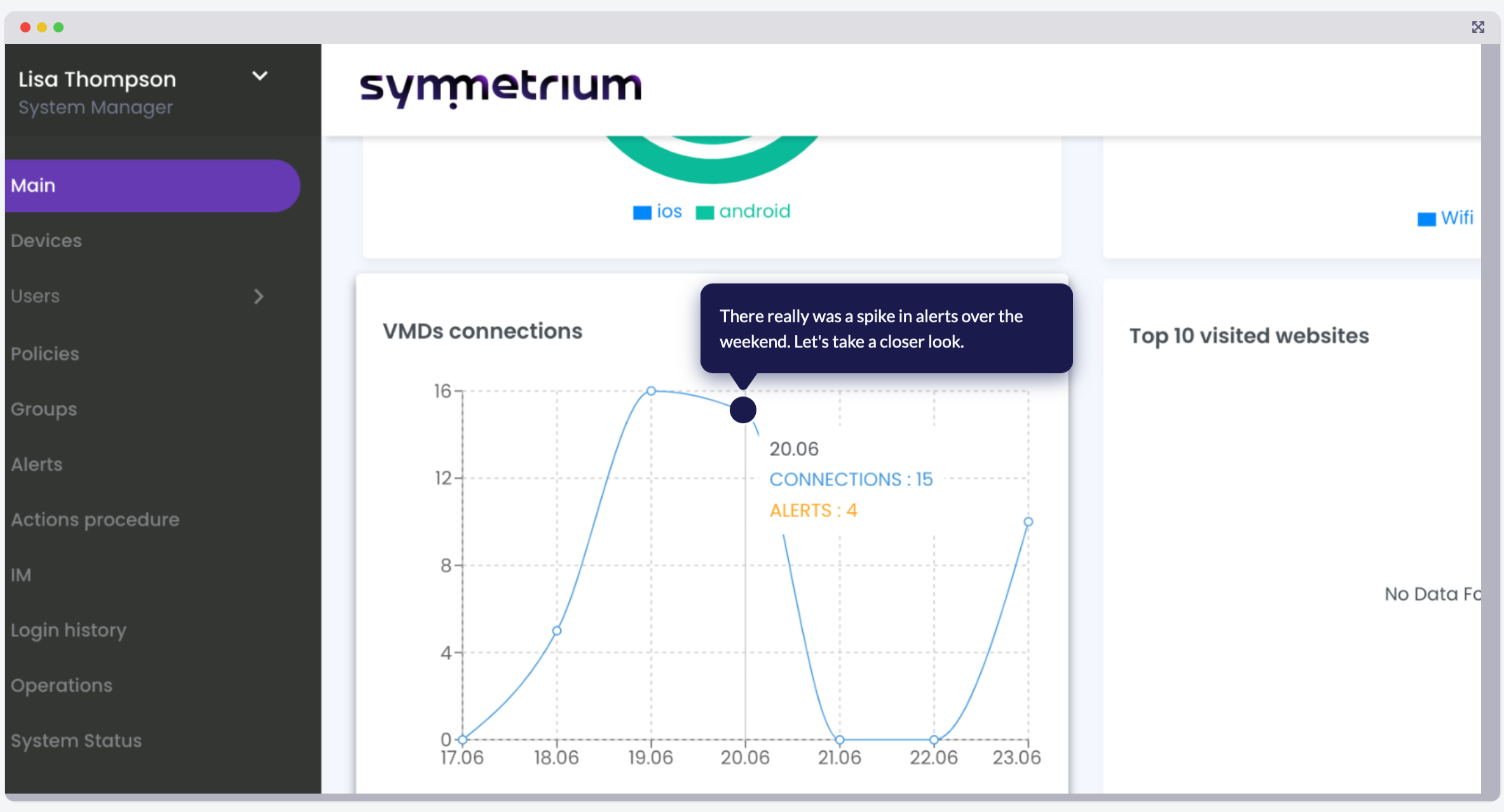
Within the Symmetrium dashboard, Lisa can see there was a spike in alerts over the weekend. She identifies the specific alert Joan messaged her about. It was automatically sent when a user broke protocol and took a screen shot while the Symmetrium app was open on their device. 

  1. Identify suspicious user activity 

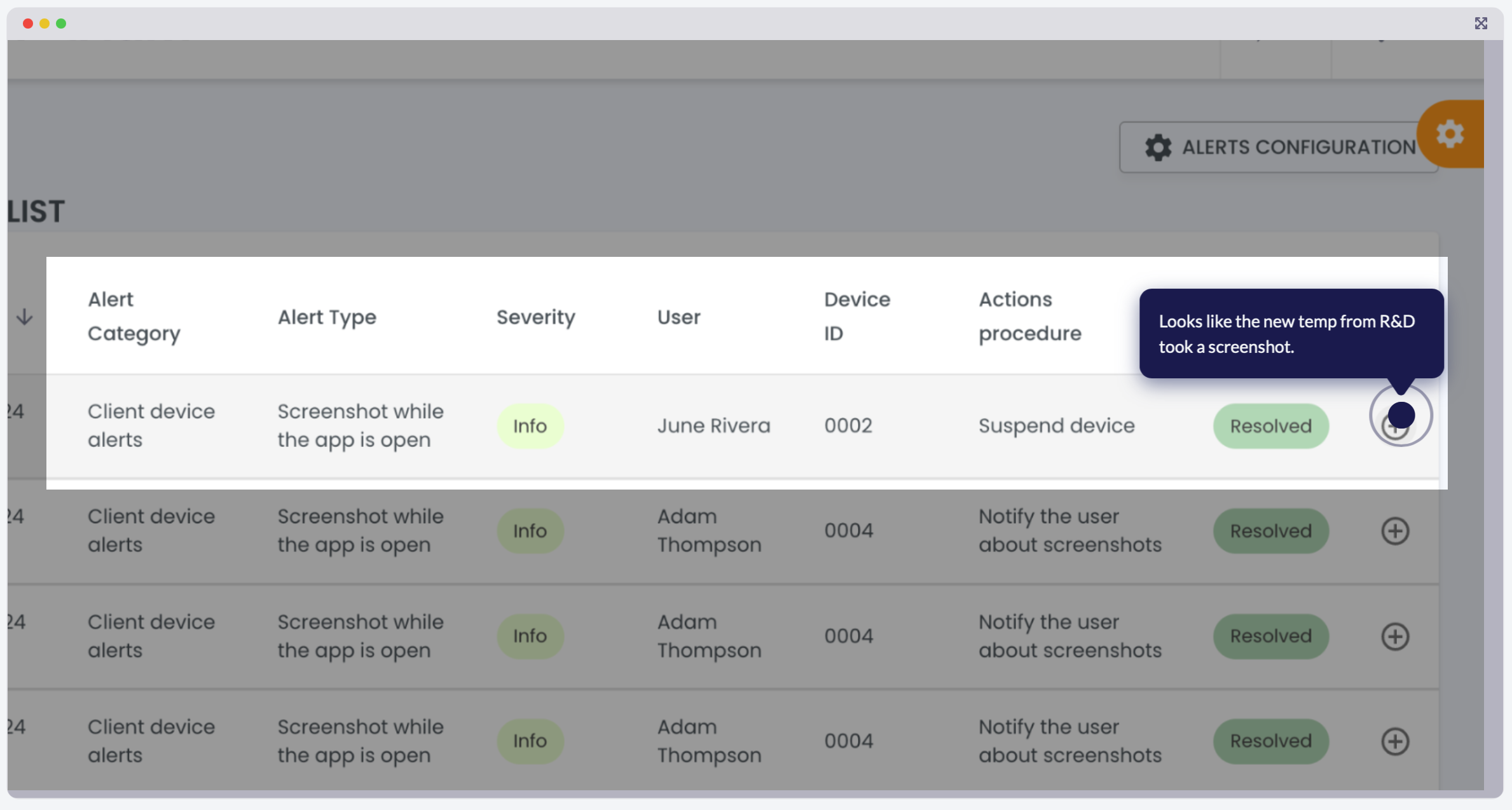
When Symmetrium sends an alert, its dashboard will specify the time, type of infraction and the device owner. So Joan immediately can see June Rivera, a new temp worker from R&D was at fault for triggering the alert. 

  1. Set stringent security guardrails 

The alert triggered specific actions Joan had set as security guardrails. This included shutting down the device’s access to sensitive data, sending email to the admin and sending a warning notification to the user. The guardrails are set to ensure compliance to security protocols. Once these have been breached, the system has been set up to suspend the offending device. 

  1. View the suspicious activity

Safe in the knowledge that June’s device was instantly suspended, Joan has the time to do some investigative work. She can see the screenshot, which is stored directly on the platform, taken by June’s mobile device, and opens it for review with one click. 

  1. Take the appropriate action 

Joan is relieved. After reviewing the screen shot taken by June she can see it was accidental and taken in error. She reactivates June’s device with one click. Mistakes happen, and Symmetrium, leaving nothing to chance, has the flexibility to quickly review and take the appropriate action.  

Security Alerts: Ensuring Constant Enforcement of Security Policies

Security alerts are vital to provide real-time notifications of potential risks and breaches of sensitive data. These alerts help security teams to enforce compliance with security policies, reduce downtime caused by breaches, and enhance overall visibility into device activities, ensuring a robust defense against an ever-evolving threat landscape. 

As demonstrated by Joan and Lisa’s experience, Symmetrium’s automated alerts, instant device controls, and streamlined investigation tools transform potentially risky situations into quickly resolved incidents. The platform’s balance of rigorous security and operational flexibility ensures your sensitive data stays protected without sacrificing productivity. 

Ready to see how Symmetrium can strengthen your organization’s mobile security? Book your personalized demo today and discover why leading companies trust us to protect their most valuable assets.

What is Virtual Mobile Infrastructure? Benefits, Challenges and Use Cases

As mobile devices become increasingly central to both personal and professional life, the need for secure, efficient, and flexible technologies has grown. One such technology that’s gaining traction is Virtual Mobile Infrastructure (VMI).

What is Virtual Mobile Infrastructure?

VMI is a technology that allows mobile applications and environments to run on centralized servers rather than directly on physical mobile devices. In essence, VMI separates the mobile operating system from the hardware, enabling users to access their mobile apps and data through a virtual instance hosted in the cloud or on a private server.

Unlike traditional mobile infrastructure solutions, which focus on securing devices through hardware or software-based controls, VMI eliminates the need to secure the physical device altogether. Users interact with a virtual mobile device through a lightweight client app or browser, which streams the virtual device’s interface to their endpoint. This approach significantly enhances security and scalability for organizations dealing with sensitive information.

How Virtual Mobile Infrastructure Works

The core of VMI lies in the concept of mobile virtual machines. Here’s how it typically works:

  1. Centralized Hosting: The mobile OS and apps are hosted on a server, which could be in a public cloud, private cloud, or on-premises data center.
  2. Streaming Interface: The interface of the hosted mobile OS is streamed to the user’s endpoint device in real time. This is similar to how virtual desktop infrastructure (VDI) works, but optimized for mobile interfaces.
  3. Lightweight Client App: Users access the virtual mobile environment via a lightweight client app or web browser. The endpoint device becomes a mere display and input tool, with no data stored locally.
  4. Secure Communication: Data is transmitted between the server and the client using secure protocols, ensuring end-to-end encryption and protecting against breaches.

This architecture ensures that sensitive corporate data remains within the controlled server environment, mitigating the risks associated with data loss or theft from compromised devices.

Benefits of Virtual Mobile Infrastructure

VMI offers several compelling advantages for organizations, especially those managing large fleets of mobile devices or handling sensitive data. Here are the primary benefits:

1. Enhanced Security

With VMI, no sensitive data is stored on the physical device. Even if a device is lost, stolen, or compromised, the data remains secure within the centralized server. This makes it an ideal solution for industries with strict compliance requirements, such as healthcare, finance, and government.

2. Simplified Mobile Device Management

Traditional mobile device management remote control solutions can be complex and resource-intensive. VMI simplifies this by eliminating the need for device-level configurations. IT teams can manage all virtual devices centrally, reducing overhead and improving efficiency.

3. Device-Agnostic Access

VMI enables users to access their virtual mobile environment from any device, regardless of its operating system or hardware capabilities. This flexibility is particularly valuable in bring-your-own-device (BYOD) environments.

4. Cost Efficiency

By reducing the reliance on high-end mobile hardware and minimizing the need for expensive device management tools, VMI can lower total cost of ownership (TCO) for organizations.

5. Scalability

Since virtual mobile environments are hosted on servers, scaling up or down is as simple as allocating more resources to the server. This makes VMI an excellent choice for organizations with fluctuating workforce sizes or seasonal demands.

Potential Challenges and Limitations of Virtual Mobile Infrastructure

While VMI has numerous advantages, it’s not without its challenges. Organizations considering adopting this technology should be aware of the following limitations:

1. Network Dependency

Since VMI relies on streaming the mobile interface to the user’s device, a stable and high-speed network connection is critical. In areas with poor connectivity, the user experience may suffer.

2. Latency and Performance Issues

Although VMI technology has advanced significantly, latency can still be an issue, particularly for resource-intensive applications like video editing or gaming. Organizations need to invest in robust server infrastructure to minimize these issues.

3. Initial Setup Costs

Implementing VMI requires investment in server infrastructure, software licenses, and possibly custom development. While the long-term cost savings are significant, the initial setup can be a barrier for smaller organizations.

4. Limited Offline Functionality

Since VMI relies on real-time streaming, offline access is not possible. This can be a drawback for users who need to work in environments without reliable internet access.

5. User Training

Adopting a new technology like VMI may require training for employees, especially those who are less tech-savvy. Ensuring a smooth transition is critical to maximizing adoption rates.

Use Cases for Virtual Mobile Infrastructure

Despite its challenges, VMI is well-suited for a variety of industries and scenarios. Here are some of the most promising use cases:

1. BYOD Environments

With the rise of bring-your-own-device (BYOD) policies, organizations face the challenge of securing corporate data on personal devices. VMI allows employees to access a secure virtual mobile environment on their own devices, eliminating the need for invasive device management solutions.

2. Highly Regulated Industries

Industries such as healthcare, finance, and government are subject to strict data security and compliance requirements. VMI provides an extra layer of security by ensuring that no data is stored locally on the device.

3. Field Work and Remote Teams

For field workers and remote employees who rely on mobile devices, VMI offers a secure and scalable solution. They can access their virtual mobile environment from anywhere, without risking data breaches if their device is lost or stolen.

4. Testing and Development

Developers can use VMI to test applications on virtual mobile environments without the need for multiple physical devices. This streamlines the development process and reduces costs.

5. Temporary Workforces

Organizations with temporary or seasonal employees can use VMI to provide them with secure access to corporate resources. Once the employment period ends, the virtual environment can be easily decommissioned.

How Symmetrium Leverages VMI to Deliver the Optimum Solution for Zero-Trust Mobile Security

Symmetrium leverages Virtual Mobile Infrastructure (VMI) to provide zero-trust mobile security by transforming any mobile device into a virtual extension of an organization’s network. This approach ensures that sensitive data remains within the secure corporate environment, aligning with zero-trust principles.

Key Components of Symmetrium’s VMI:

  1. Virtual Mobile Devices (VMDs): Symmetrium deploys VMDs hosted within the organization’s IT infrastructure. These virtual devices inherit all compliance, security, and IT protocols of the enterprise, ensuring consistent policy enforcement.
  2. No Data at Rest: By utilizing end-to-end encrypted streaming, Symmetrium ensures that no data resides on the physical mobile device. Users interact with a virtual workspace, and all data processing occurs within the secure network, minimizing the risk of data breaches.
  3. IP-Layer Security: Symmetrium assigns static IP addresses to VMDs, allowing precise control over network access and web filtering. This method simplifies management and enhances security by eliminating the complexities associated with VPN configurations.
  4. Zero-Trust Architecture: The platform enforces strict authentication and authorization protocols, including multi-factor authentication and biometric login. This ensures that only verified users can access the virtual mobile environment, adhering to the zero-trust model of “never trust, always verify.”
  5. Seamless User Experience: Symmetrium provides a native mobile experience, allowing users to access a secure work environment without compromising personal data or privacy. This separation is crucial for Bring Your Own Device (BYOD) policies, ensuring organizational data remains protected.

By integrating VMI with a zero-trust framework, Symmetrium offers a robust solution that secures mobile access, maintains data integrity, and simplifies management for IT administrators. This approach effectively mitigates risks associated with mobile device usage in corporate settings.

VMI: Transforming the Deployment of Mobile Security 

VMI is transforming the way organizations think about mobile security and management. By centralizing the mobile environment on servers and eliminating the need to store data locally on devices, VMI offers a secure, scalable, and flexible solution for modern businesses. While challenges such as network dependency and setup costs exist, the benefits—enhanced security, simplified management, and cost efficiency—make VMI a compelling choice for many use cases.

Whether you’re navigating BYOD challenges, securing data in a regulated industry, or seeking scalable solutions for remote workforces, VMI could be the future of your mobile security strategy. As more organizations adopt this technology, it’s poised to become a cornerstone of enterprise mobility and security in the years to come.


Discover why Symmetrium is the optimal VMI solution to protect your organization from escalating mobile security threats by scheduling a demo today.

From Guidance to Action: How to Implement CISA’s Mobile Security Best Practices with The Symmetrium Platform

In the wake of recent high-profile cyberattacks targeting major telecommunications providers, linked to Chinese threat actors, the US Cybersecurity and Infrastructure Security Agency (CISA) has taken decisive action to address growing concerns about mobile communication vulnerabilities. To mitigate these risks, CISA has released its comprehensive Mobile Communications Best Practice Guidance, which serves as a critical resource for high-risk individuals and organizations. This guidance outlines a robust framework of protective measures designed to fortify mobile communication security, protect sensitive information, and defend against sophisticated cyber threats. 

When working with customers in highly regulated sectors, such as healthcare, finance and government, we’ve seen firsthand how adopting such best practices can bolster their resilience against attacks and safeguard critical data in an increasingly volatile cyber landscape. Our clients are already benefiting from such best practices and here’s how even more organizations can take these recommendations from theory to reality, and tackle critical mobile security risks head-on:

1. Zero-Trust Architecture (No Data at Rest)

CISA Guidance: Assume all mobile device communications are at risk of interception. Understand they are inherently vulnerable to various threats, including man-in-the-middle attacks, malicious apps and compromised networks.

Symmetrium in Action: In our work with clients, no strategy has proven more effective than ensuring no data comes to rest on mobile devices. Symmetrium achieves this by transforming any mobile device, managed or unmanaged, into a secure virtual extension of the organization’s network. This creates the ideal zero-trust environment, because sensitive data never leaves the organization’s infrastructure. This approach eliminates risks associated with lost or stolen endpoints and significantly reduces the potential for data breaches.

2. End-to-End Encrypted Streaming

CISA Guidance: Use end-to-end encryption to safeguard sensitive information. Encryption should be treated as a fundamental layer of protection for mobile communications, especially for individuals likely to be targeted by malicious actors. 

Symmetrium in Action: We’ve seen first-hand how our peer-to-peer (P2P) encrypted streaming makes a real difference in securing communications. By integrating P2P encrypted streaming, Symmetrium effectively mitigates the risks associated with data transmission. This ensures text, video and voice is protected, and even if intercepted the data remains unreadable to unauthorized parties.

3. Seamless Integration and Scalability

CISA Guidance: Keep hardware and software updated to reduce vulnerabilities. Operating systems and applications on mobile devices should be checked weekly to ensure the most current versions are being used. It is optimal to enable auto-update on mobile devices to ensure timely patching of the operating system and applications.

Symmetrium in Action: Clients often tell us how challenging it is to manage updates across multiple devices without disruption. Symmetrium’s centralized dashboard automates and simplifies this process, ensuring all devices remain secure and up-to-date. With auto-updates, organizations of any size can scale securely across iOS and Android devices, maintaining compliance without additional user effort or downtime.

4. Advanced Security Features

CISA Guidance: Deploy multifactor authentication (MFA) to strengthen identity verification and prevent unauthorized access, even if passwords are compromised. Secure DNS services are advised to block malicious websites, prevent DNS-based attacks, and protect mobile traffic on untrusted networks.

Symmetrium in Action: In our work with enterprises, we have implemented advanced features like Geo-Fencing, which allows organizations to establish virtual boundaries around specific geographic areas, enabling precise control over mobile device access and activity within those zones. This ensures enhanced security by restricting sensitive data access or application functionality based on location, helping to safeguard assets and enforce compliance policies.For example, a financial firm can limit access to sensitive systems within office premises, automatically blocking offsite attempts. Additionally, our IP-Layer Security mitigates threats like IP spoofing by ensuring only trusted devices and networks can access sensitive resources, further enhancing the organization’s security posture.

5. Compliance and Regulatory Adherence

CISA Guidance: Implement robust security measures to ensure compliance with relevant regulations and standards, such as encrypting sensitive data, employing secure authentication mechanisms, and adhering to regulatory laws like HIPAA.

Symmetrium in Action: We know the importance of aligning security measures with compliance needs from our experience of  working with organizations in highly regulated sectors such as healthcare or finance. Symmetrium enables medical firms, for example, to meet HIPAA regulations by providing advanced encryption and secure data management solutions that protect sensitive patient information. Our platform ensures compliance through automated access controls, detailed audit trails, and robust privacy safeguards. By integrating seamlessly with existing workflows, Symmetrium helps organizations maintain regulatory adherence while enhancing operational efficiency.

6. User-Centric Experience

CISA Guidance: Implement solutions with a user-centric approach by prioritizing intuitive interfaces, clear security prompts, and seamless usability. Educate users on secure practices while minimizing friction to encourage adoption and adherence to security protocols.

Symmetrium in Action: One of the aspects our clients appreciate most is how Symmetrium delivers seamless encryption without requiring additional VPNs or complex settings. Employees can continue using familiar messaging and email clients, enhancing adoption without sacrificing security. With intuitive interfaces and automated compliance features, we ensure that user experience remains frictionless while adhering to the highest security standards.

Symmetrium: The Ultimate Solution for CISA-Compliant Mobile Security

CISA’s guidelines pinpoint top vulnerabilities in mobile communications. Symmetrium addresses each recommendation — from zero-trust architecture and advanced encryption to compliance and user-friendly design — providing enterprises with a proven, holistic security solution. By neutralizing threats at every layer, Symmetrium stands out as the most efficient and comprehensive choice for safeguarding mobile communications.

Schedule a demo to see how Symmetrium can protect your organization from escalating mobile security threats.

Enterprise Mobile Device Management Pros and Cons

In our mobile-centric world, companies rely on a vast array of mobile devices, such as smartphones, tablets, and laptops, to facilitate operations and communication. With the unstoppable rise of mobile workforces, ensuring security and productivity across these devices is crucial. To achieve this, Enterprise Mobile Device Management (MDM) has become an increasingly essential solution for organizations. MDM, in short, is a centralized solution designed to manage, monitor, and secure mobile devices within an enterprise environment. But while enterprise MDM offers many benefits, it also comes with challenges. In this article, we’ll dive into the pros and cons of MDM solutions, highlighting its features, benefits, and potential limitations.

What is an MDM Solution?

MDM is a technology solution that enables organizations to secure, control, and monitor mobile devices such as smartphones, tablets, and laptops used by employees. With the goal of safeguarding enterprise mobile device security, MDM provides businesses with centralized control over the devices accessing corporate networks and sensitive information. MDM solutions allow administrators to manage device configurations, enforce security policies, and, if necessary, remotely wipe data from lost or compromised devices.

Enterprise MDM solutions typically involve software tools that can be deployed on devices through cloud or on-premises platforms. The solution provides IT departments with greater visibility over mobile devices, helping to ensure that only authorized devices and users have access to company resources. This is especially crucial for organizations operating under regulatory compliance requirements, where maintaining enterprise mobile security is paramount.

Key Features of MDM Solutions

MDM solutions for enterprises vary in complexity, but most offer a suite of features to manage and protect devices within an enterprise setting. Here are some key features commonly found in enterprise device management platforms:

  1. Device Enrollment and Authentication

Simplifies the process of enrolling new devices and authenticating users, ensuring that only verified devices and employees can access corporate resources.

  1. Policy Enforcement and Compliance Management

Allows organizations to enforce security policies and monitor compliance, helping to ensure that devices adhere to specific standards, such as password protection, encryption, and app restrictions.

  1. Application Management

Provides the ability to manage applications on employee devices, including app deployment, updates, and removal, which helps keep software consistent and secure across the enterprise.

  1. Content Management

Allows for controlled access to company content, enabling secure file sharing and document collaboration while maintaining the integrity of sensitive information.

  1. Remote Device Control and Support

Enables IT administrators to remotely manage, troubleshoot, and control devices. This feature is invaluable for offering real-time support to employees, especially those working remotely.

  1. Data Loss Prevention (DLP) and Remote Wiping

DLP features safeguard against unauthorized data transfers, and remote wipe capabilities allow IT to erase data on lost or stolen devices to protect sensitive information.

  1. Real-Time Monitoring and Reporting

Provides insights into device usage, security compliance, and application performance, helping IT teams quickly identify potential issues or security threats.

Benefits of Implementing Enterprise MDM

The adoption of MDM offers numerous advantages that help streamline operations, enhance security, and improve productivity. Here are the primary benefits of implementing a MDM solution for your organization:

  1. Enhanced Enterprise Mobile Device Security

Security is the most significant driver behind enterprise MDM implementation. MDM solutions allow organizations to establish and enforce security policies across all devices, minimizing the risk of data breaches and unauthorized access. MDM provides tools such as encryption, secure access protocols, and the ability to monitor device compliance in real-time, ensuring that company data remains protected.

  1. Improved Device Visibility and Control

With MDM, IT departments have a centralized view of all mobile devices within the organization. This visibility makes it easier to monitor usage, detect unusual activity, and manage device settings. The ability to remotely control and support devices allows for quick resolution of technical issues and streamlined management of device configurations.

  1. Increased Employee Productivity

By giving employees access to secure, company-approved applications and data, MDM solutions enable a more productive mobile workforce. Employees can work from anywhere, using their devices to complete tasks without compromising security. Additionally, MDM solutions can restrict access to non-work-related apps, helping employees stay focused on their tasks.

  1. Streamlined IT Operations and Support

Enterprise MDM simplifies the management of multiple devices by consolidating them into one system. IT departments can quickly deploy updates, install apps, and provide troubleshooting support from a centralized platform. This efficiency reduces the time and resources needed to manage each device individually and allows IT staff to focus on more strategic tasks.

  1. Regulatory Compliance

Many industries, such as healthcare and finance, are subject to strict regulatory requirements for data security. MDM solutions support compliance by enforcing necessary security policies and tracking user activity. For organizations in regulated industries, MDM provides an added layer of assurance that they are meeting compliance standards for data protection.

  1. Cost Savings on Long Run

While MDM solutions require an upfront investment, they often result in long-term cost savings by reducing security breaches, minimizing device downtime, and lowering the time required for device management. MDM also helps prevent the loss of intellectual property, which can be financially devastating.

Potential Challenges and Drawbacks of Enterprise MDM

While enterprise MDM offers several benefits, it’s not without challenges. Here are some of the potential drawbacks and limitations of MDM:

  1. Privacy Concerns

MDM solutions monitor device activity and location, which may raise privacy concerns among employees, especially if they are using personal devices for work. The ability to remotely control and wipe devices can feel intrusive, creating potential tension between employees and IT departments. Organizations must balance security needs with respect for employee privacy by establishing clear policies and communication regarding device monitoring.

  1. Implementation Complexity

Setting up and managing an MDM solution can be complex, especially for large organizations with a diverse range of devices and operating systems. Deployment can require significant IT resources, and onboarding new devices may involve training employees on how to use MDM tools properly. Additionally, maintaining compatibility with various devices and operating systems can be challenging, particularly in organizations with bring-your-own-device (BYOD) policies.

  1. Upfront Investment Costs

Implementing MDM involves upfront costs, including software licensing fees and potential infrastructure upgrades. For smaller businesses, these costs may be prohibitive, and they may find it difficult to justify the expense relative to the benefits. Additionally, some MDM solutions charge on a per-device basis, which can lead to higher costs for organizations with a large number of mobile devices.

  1. Device Performance Issues

Some MDM solutions can impact device performance, particularly when operating system updates or security scans are running. Employees may experience slower device speeds or shorter battery life due to the constant background processes associated with MDM. Ensuring that MDM tools do not hinder employee productivity requires careful optimization and testing.

  1. Dependency on Network Connectivity

Since MDM relies on continuous communication between the device and the MDM server, network connectivity is crucial. In areas with poor network coverage or during times of internet outages, certain MDM features may be limited, affecting productivity and the effectiveness of security measures. Organizations need to consider these limitations and provide alternative solutions when network connectivity issues arise.

  1. Potential Resistance from Employees

Introducing an MDM solution can be met with resistance from employees who view the software as restrictive or invasive. Implementing a change management strategy and educating employees on the benefits of MDM is essential to fostering acceptance and compliance. Clear policies and transparent communication about how MDM supports security and protects both company and employee data can help alleviate concerns.

Symmetrium: The Optimal Scalable Solution for Enterprise Mobile Security

Symmetrium’s highly scalable zero-trust mobile solution is purpose-built to provide organizations the optimal secure and flexible mobile device management to secure data and meet regulatory requirements. 

Symmetrium creates virtual devices within an organization’s IT environment that, when accessed remotely, serve as secure extensions of the organization’s security and compliance policies. The outcome is a seamless, native mobile experience, leveraging end-to-end encrypted streaming, that simplifies secure data access.

Unlike other MDM solutions that focus on protecting mobile devices and users, Symmetrium protects data no matter what device or user is accessing it. This is possible because using Symmetrium corporate data is always accessed virtually through the organization’s network and never physically leaves the security of the network to reside on the user’s device. This approach ensures sensitive data stays secure, even if a user’s device is compromised, eliminating potential risks.

Final Thoughts: Balancing Security and Usability

With key features like remote device management, application control, and data loss prevention, MDM solutions for enterprises can significantly enhance organizational mobile device security, streamline IT operations, and improve the overall user experience.

For enterprises considering MDM, the key to maximizing its benefits lies in selecting the right solution flexible to meet the organization’s specific needs and creating an environment of trust and collaboration between employees and IT teams. By doing so, businesses can achieve a robust mobile security strategy that supports productivity and growth in today’s fast-paced digital landscape.

Discover why Symmetrium is the optimal MDM to protect your organization from escalating mobile security threats by scheduling a demo today.

close-tag

We’re proud to be the ones making TPRO, CISO, IT and vendors - happy

by ramping up zero-trust mobile access.

Explore all use cases now