The modern workforce is mobile, fast-moving, and rarely sitting at a desk. Employees now work from airports, cafés, home offices, and job sites, using smartphones, tablets, and laptops to stay productive wherever they are. This shift brings more agility, but it also creates more surface area for risk.
Mobile workforce management is how organizations keep that surface under control. It ensures that mobile employees have secure access, protected data, and the tools they need to operate efficiently. Without it, productivity slows, compliance falters, and data becomes harder to safeguard.
Managing a mobile workforce requires more than just devices. It demands policy alignment, continuous visibility, and smart tooling like mobile application management that enforces controls at the app level without slowing people down.
This guide outlines 15 practical best practices for leading mobile teams with confidence. These are field-tested strategies that help organizations stay secure, stay compliant, and keep work moving. If your workforce is mobile, these are the systems that make it manageable.
What is Mobile Workforce Management and Why It Matters
Mobile workforce management is the process of coordinating people, policies, apps, and devices to support employees working outside the traditional office. It is how companies enable real-time work across roles, locations, and platforms, while maintaining control, security, and compliance.
Mobile teams today include field technicians, sales reps, hybrid employees, consultants, and distributed support staff. All of them rely on mobile access to critical systems and workflows. Without a clear management framework in place, that access can become inconsistent, insecure, or unreliable.
Organizations use mobile workforce management software to create structure. These tools help provision devices, assign access, enforce updates, and monitor compliance. They also integrate with support systems and mobile security solutions to give IT and security teams full oversight.
Many companies adopt broader enterprise mobile management frameworks to handle everything from device policy to app governance. These systems bring together mobile configuration, patching, identity, and analytics, giving security teams the context they need to detect risk and respond fast.
Unmanaged mobile environments increase exposure. Misconfigurations, unapproved apps, and inconsistent access controls become easy targets. That is why mobile workforce management is not just an operational concern. It is a core business strategy. Organizations that get it right gain flexibility without losing control.
15 Best Practices for Mobile Workforce Management
Managing a mobile workforce means finding the right balance between agility and control. Employees expect flexibility, but organizations must enforce policy, protect data, and ensure consistent performance. These 15 best practices are grouped into three core areas – foundation, security, and productivity – to help you build a mobile workforce strategy that scales without compromise.
Foundation and Policy
1. Develop a clear mobile workforce policy
Every successful mobile program begins with clear expectations. A mobile workforce policy should define approved devices, usage guidelines, app restrictions, security requirements, and acceptable behavior. It should also outline escalation procedures for lost devices, support boundaries for personal equipment, and legal considerations tied to data access. A well-communicated policy prevents confusion and keeps every team aligned.
2. Define BYOD vs. corporate-owned device rules
Personal devices and company-issued hardware come with different risks and responsibilities. Define which roles are eligible for each, what configurations are required, and how enforcement differs. BYOD users may require lighter-touch management, such as containerization, while corporate devices can be subject to full device controls. Make the distinction clear to avoid compliance blind spots.
3. Align mobile use with business roles and permissions
Not every employee needs access to the same resources. A field technician may need access to job apps and location tools, while an executive might require real-time dashboards and communication tools. Define access by job function, not department, and tailor tools and controls accordingly. This makes security more targeted and user experience more intuitive.
4. Centralize access and provisioning
Provisioning and deprovisioning should never be manual. Integrate mobile access with your identity provider so that access can be granted or revoked automatically based on role, device status, or employment status. Centralization avoids gaps during transitions and ensures a uniform security posture across the organization.
5. Create mobile onboarding and offboarding protocols
First impressions matter – and so does clean removal. Onboarding should include secure delivery of apps, login credentials, and usage guidance. Offboarding should revoke access instantly, wipe containers where needed, and confirm the removal of sensitive data. Automating this process reduces risk during turnover or device loss.
Security and Compliance
6. Enforce mobile device compliance for regulated environments
Regulatory requirements do not stop at the office firewall. Standards like GDPR, HIPAA, and SOX apply to mobile endpoints too. That means data must be encrypted, access must be logged, and policy enforcement must be consistent. Use configuration profiles and app containers to maintain compliance without creating friction for users.
7. Require MFA and device posture checks
Passwords are no longer enough. Enforce multi-factor authentication for every sensitive system, and evaluate the device’s security posture before granting access. Devices should meet a baseline, patched OS, no jailbreaking, and encryption enabled, before they are allowed to interact with enterprise services. This reduces the risk of compromised endpoints acting as attack vectors.
8. Apply role-based access and dynamic permissions
Access should be conditional, not static. Map permissions to roles and adjust them based on device risk, geographic location, or time of day. For example, limit access to financial systems after business hours or from unknown networks. Dynamic rules allow your team to adapt security in real time, without blocking legitimate workflows.
9. Set automated session timeouts and geofencing
Inactive sessions create unnecessary risk. Timeouts should be enforced based on app type, data sensitivity, and context. A geofence adds another control layer by automatically denying access from high-risk regions or locations outside predefined boundaries. This gives your team granular control over how and where data is accessed.
10. Audit and log mobile sessions regularly
Session logging is essential for both security and compliance. Every session should capture device ID, user identity, app accessed, duration, and geographic information. Anomalies, like unexpected access times, unknown devices, or out-of-region logins, should be flagged and reviewed. Routine audits ensure policies are followed and help detect subtle breaches early.
Productivity and Tooling
11. Use mobile application management software for secure app control
Controlling apps is often more effective than controlling devices. Mobile application management software enables your team to push, configure, restrict, and revoke apps without affecting personal data or usage. This is especially valuable in BYOD environments, where full-device management can create privacy concerns and adoption resistance.
12. Provide productivity apps that meet both user and compliance needs
Employees will find workarounds if tools are slow, clunky, or unavailable. Choose productivity apps that are secure, easy to use, and compliant with your organization’s requirements. This includes secure messaging, file sharing, project tracking, and remote support tools. The better the tools, the lower the risk of shadow IT.
13. Regularly update and patch mobile OS and apps
Unpatched software is one of the most common causes of mobile compromise. Use automated update policies to keep devices current, and monitor for OS versions that fall behind. Include third-party app patching in your workflows, especially for widely used tools like browsers, communications apps, and productivity platforms.
14. Enable real-time support and troubleshooting tools
When something breaks in the field, downtime can cost more than just lost productivity. Provide real-time support options — including live diagnostics, secure messaging, app reinstallation, and remote session assistance — to help users resolve issues quickly. The faster the response, the lower the disruption.
15. Collect user feedback and iterate on mobile workflows
Your mobile workforce is the best source of insight into what is working and what is not. Create lightweight feedback loops to gather input on app performance, access issues, and workflow gaps. Use this feedback to improve tools, simplify processes, and eliminate frustration before it impacts productivity.
Challenges in Mobile Workforce Management
Building a high-performing mobile workforce is not without its challenges. Many organizations struggle to strike the right balance between control and flexibility, especially when trust, autonomy, and speed are critical to how employees work.
Balancing security with productivity is one of the most persistent friction points. Locking down devices too tightly can frustrate teams and slow workflows. Loosening policies too much increases the risk of exposure and noncompliance. The key is to enforce policy without obstructing performance.
Maintaining visibility and control without user resistance is another challenge. Workers do not want to feel monitored or micromanaged. Security teams need tools that offer oversight without becoming invasive. That means focusing on app-level control, clear communication, and transparency around what is and is not being tracked.
Device diversity adds another layer of complexity. Companies must support multiple operating systems and device types while still enforcing consistent controls. Android, iOS, and hybrid environments all require slightly different approaches.
Finally, compliance across borders is an evolving challenge. Privacy laws, data residency requirements, and enforcement expectations differ from one region to the next. Teams need centralized control with flexible policy engines that adapt to geography and industry.
This is where an enterprise mobile management strategy becomes essential. It provides the structure and oversight needed to manage complexity while giving mobile workers the freedom to move at speed.
How Symmetrium Supports Secure Mobile Workforce Management
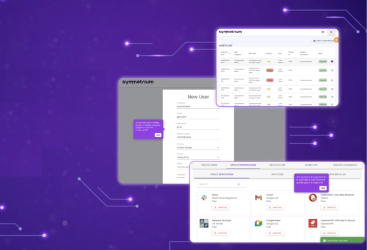
Symmetrium brings everything covered in this guide into one platform — without the friction of traditional endpoint control.
It starts with workspace virtualization, which delivers a fully functional mobile environment that is separate from the physical device. That means there is no data at rest, no dependency on full-device MDM, and no conflict between security and privacy.
Security teams get real-time visibility, policy-level control, and session-based enforcement. Whether employees are on corporate devices or personal phones, access is containerized, managed, and always revocable.
For IT and compliance leaders, Symmetrium offers the ability to enforce all 15 best practices across provisioning, access, monitoring, and governance without creating roadblocks for the people using it.
It also makes BYOD programs viable at scale. Employees get a native, seamless experience. Admins get the control they need. Legal and compliance teams get the audit trails and risk reduction they require.
If you are looking for a single architecture that supports mobile workforce policy, visibility, compliance, and user experience. Symmetrium was built for it.
Driving Mobile Workforce Management Success
Success in mobile workforce management does not come from any single tool or policy. It comes from aligning the right technologies with clear processes and a workforce that understands how to use both effectively.
At its core, managing a mobile workforce is about combining flexibility with control. Employees need freedom to work wherever they are. Security teams need confidence that data, access, and compliance are consistently enforced. When those two goals are in conflict, productivity suffers and risk increases.
The organizations that thrive in this environment are the ones that treat mobile access as a strategic layer of operations — not just an IT responsibility. They build clear policies, enable secure workflows, and choose platforms that reduce complexity rather than add to it.
If you have not recently audited your mobile environment, now is the time. Review your current policies. Identify the tools that are missing or underused. Then take action to strengthen the foundation.Platforms like Symmetrium make this process easier by tying everything together in a single, secure architecture. When execution is simplified, policy becomes enforceable and mobile work becomes sustainable. That is how real mobility scales.
Want to hear more? Book a demo.