Sensitive data, business applications, and corporate networks are all just a tap away on mobile devices, making them prime targets for cyber threats. But while mobile device management (MDM) solutions can help protect organizations from breaches and data loss, they often introduce hurdles of their own. Many security measures can be cumbersome for users, adding layers of authentication, restricting access, or requiring frequent updates and compliance checks. For IT teams, managing these security protocols across diverse devices and operating systems can become a full-time task.
In the previous blog in this series we looked out how easy it was for pharmaceutical in-field sales manager, Amy Fix, to ensure all of her work is contained within a single, secure environment while boosting her ability to effortlessly (and securely) gather confidential information and documentation. View Amy’s journey and others examples of Symmetrium in action via our product demo hub here.
Amy’s colleague, Jake Yau, was recently promoted to lead the company’s new GRC team. Now he needs to set up all his team on the company’s MDM system. Luckily, Amy’s and Jake’s company use Symmetrium, so the process could not be faster or more seamless. So, let’s take a look at the simple steps to onboard Jake’s GRC team.
#1 – Centralized Device Management Ensures Super-fast Setup
Jake sends a message attaching his team’s access requirements asking for help to set them up in Symmetrium’s zero-trust, mobile data governance, and security platform.
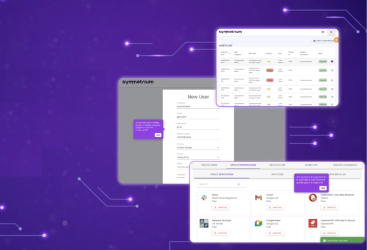
Quickly setting up new departmental groups, and enforcing and modifying policies across all devices, takes only a few clicks. Symmetrium seamlessly allows you to sync all data about a new group of users directly from the company’s IDP or to add a group manually. So in seconds all data regarding Jake’s GRC team is set up in Symmetrium.
#2 – Quickly Establish Role-Based Policies
Using Symmetrium, setting up customized role-based policies for different user groups and departments is child’s play. It’s also simple to add deeper layers of security, such as web filtering and geo-location, using the Symmetrium dashboard. These can be implemented to standardize compliance by default to specific groups, in line with company-wide policies. These policies enable you to control every aspect of each user’s permissions and access in one place.
#3 – Application Management
It is easy to manage access to specified approved apps, based on the needs of the group. Jake can detail the needs of his new team and as long as they comply with company policy, the various apps can immediately be allocated to users within Symmetrium’s secure workspace.
Apps can be added, removed or updated with one-click from a central location, regardless of device or OS.
#4 – Implement Security Guardrails
While Symmetrium allows you to instantly define and apply policies to one or more groups, it also alerts, warns or immediately shuts down devices and suspends users that overstep your defined security guardrails.
#5 – Managing Users
If any user breaches the security protocols they can be deactivated in one click. It is also as easy to add or move users to other groups as required.
#6 – Boosting Productivity with User-Friendly Mobile Device Management
As mobile devices become indispensable for business, they also introduce risks that require robust management solutions. Symmetrium’s user-friendly MDM platform empowers companies like Amy and Jake’s to swiftly secure devices, enforce role-specific policies, and monitor for compliance — all without overwhelming users or IT teams. By combining zero-trust governance with seamless integration, Symmetrium ensures that security protocols enhance, rather than hinder, productivity. This not only protects sensitive data but also makes secure device management an accessible, scalable solution for businesses of all sizes.
To see in action how Jake sets up his team using Symmetrium, take our “Centralized Mobile Device Management” product tour on our demo hub.
Ready to make MDM security painless? Book a demo to see Symmetrium in action.