We Built Symmetrium Go for the Deployment That Never Has to Wait

Now Live!

What is HIPAA-compliant Messaging? Here’s Everything You Need To Know

Communication tools and protocols used by organizations operating in the health sector need to meet HIPAA’s requirements for protecting the confidentiality, integrity, and availability of PHI (Protected Health Information). Traditional messaging apps often lack the stringent security measures HIPAA mandates, making them unsuitable for healthcare communications involving sensitive patient information. Their use can therefore result in hefty fines from HIPPA, such as the $3.2 million penalty imposed on The Children’s Medical Center of Dallas after the theft of unencrypted devices compromised the PHI of 6,262 individuals. 

An HIPAA-compliant messaging app is specifically designed to meet the required standards, while providing healthcare professionals with a secure, efficient way to exchange patient information.

These secure messaging systems are typically used for sending lab results, patient updates, treatment information, and scheduling data. They employ a range of security features — such as encryption, access controls, and audit logs — to prevent unauthorized access to PHI. By adhering to these standards, healthcare providers can improve communication workflows without compromising data security.

Benefits of HIPAA-Compliant Messaging

Implementing compliant messaging systems within healthcare organizations offers numerous benefits, not just for data security but also for patient care, operational efficiency, and regulatory compliance. Here are the key advantages:

1. Enhanced Data Security Compliance

Helps organizations adhere to strict data security compliance standards, ensuring PHI is adequately protected. This minimizes the risk of breaches that could result in heavy fines, lawsuits, and reputational damage. With features like encryption and two-factor authentication, these systems safeguard PHI at rest and in transit.

2. Improved Communication and Collaboration

HIPAA-compliant instant messaging provides healthcare professionals with a secure and immediate way to communicate, which is especially valuable in urgent medical situations. Instead of relying on phone calls or emails, care teams can instantly share critical patient information while maintaining HIPAA compliance, resulting in faster decision-making and improved patient outcomes.

3. Reduced Administrative Burden

Traditional communication methods — such as faxing and emailing — can be time-consuming and prone to delays. Compliant messaging apps streamline these processes, allowing for faster exchanges of lab results, consultation notes, and discharge instructions. This efficiency reduces the administrative workload, allowing healthcare professionals to focus more on patient care.

4. Increased Patient Trust

Patients are increasingly aware of privacy concerns, and knowing that their healthcare provider uses compliant messaging can enhance trust. When patients feel confident that their information is being handled securely, they’re more likely to be open and transparent, which can lead to more accurate diagnoses and better care.

5. Protection Against Legal Liability

Non-compliance with HIPAA can result in significant penalties. Compliant messaging solutions help mitigate these risks by maintaining a record of all communications, ensuring that PHI is handled according to federal guidelines. This provides organizations with documentation and evidence of compliance, which is essential in case of audits or legal challenges.

HIPAA Secure Messaging Requirements

To be considered HIPAA-compliant, messaging systems must meet specific security requirements outlined by HIPAA’s Security and Privacy Rules. These requirements ensure that patient information remains protected and accessible only to authorized individuals.

1. End-to-End Encryption

Encryption is a fundamental requirement for compliant messaging. This involves encoding data so it cannot be read by unauthorized individuals during transmission. End-to-end encryption ensures that only the sender and the intended recipient can access the message, even if the data is intercepted.

2. Access Controls

HIPAA mandates strict access controls to prevent unauthorized individuals from accessing PHI. Compliant messaging apps often require unique usernames, passwords, and two-factor authentication to verify the identity of users. Role-based access further restricts data access based on an individual’s responsibilities, ensuring that only necessary personnel can view sensitive information.

3. Audit Logs and Tracking

HIPAA requires healthcare organizations to maintain detailed records of all interactions involving PHI. Compliant messaging platforms include audit logs that track who accessed or modified a message, when it occurred, and what information was shared. These logs are crucial for demonstrating compliance and investigating potential security incidents.

4. Automatic Log-Off

Automatic log-off is a security feature that prevents unauthorized access by automatically logging users out after a period of inactivity. This reduces the risk of sensitive information being viewed by unauthorized persons if a device is left unattended.

5. Data Integrity Controls

To ensure data integrity, messaging systems must prevent unauthorized modifications to PHI. These controls ensure that messages remain unaltered during transmission and storage, preserving the accuracy of medical information exchanged between healthcare providers.

6. Data Storage and Retention Policies

HIPAA requires that PHI be retained according to specific guidelines. Compliant messaging solutions offer data storage and retention capabilities that comply with these guidelines, allowing healthcare organizations to securely store and archive messages as needed.

How to Make a Messaging App HIPAA Compliant?

Building or converting a messaging app to be HIPAA compliant involves integrating essential security features and undergoing a comprehensive compliance process. Here’s a step-by-step guide to ensuring your messaging app in compliant:

1. Integrate HIPAA Security Requirements

Start by implementing the core security requirements — end-to-end encryption, secure data storage, access controls, and audit logs. Ensure the app’s infrastructure supports secure communication, and confirm that data is encrypted both in transit and at rest. This is essential for preventing unauthorized access and safeguarding PHI.

2. Partner with a HIPAA-Certified Hosting Provider

If your app requires cloud storage, choose a hosting provider that is HIPAA-certified. HIPAA-certified providers offer compliant infrastructure and security controls, reducing the risk of data breaches. Always review the provider’s Business Associate Agreement (BAA) to ensure it covers all aspects of HIPAA compliance.

3. Implement User Authentication and Access Control Mechanisms

Secure user authentication is crucial for HIPAA compliance. Implement robust access controls, including unique usernames, strong passwords, and multi-factor authentication. These measures limit access to authorized personnel, ensuring that PHI is only available to those who need it.

4. Establish a Business Associate Agreement (BAA)

Under HIPAA, any third-party vendor handling PHI on behalf of a healthcare provider must sign a Business Associate Agreement (BAA). This contract outlines each party’s responsibilities and ensures that third parties adhere to HIPAA regulations. Part of ensuring a messaging app is HIPAA-compliant, requires all business associates to sign a BAA.

5. Conduct Regular Risk Assessments and Audits

HIPAA requires organizations to conduct regular risk assessments to identify vulnerabilities and implement necessary safeguards. Periodically audit the app’s security features, access logs, and data storage protocols to ensure continuous compliance. Any identified risks should be addressed promptly to maintain data security compliance.

6. Educate Users on HIPAA-Compliant Use

Once your app is HIPAA-compliant, train users on how to use it in a compliant manner. Educate healthcare providers on secure messaging practices, such as not sharing passwords, logging out after use, and avoiding discussions of PHI on non-compliant platforms.

7. Enable Automatic Log-Off and Session Expiration

To prevent unauthorized access, configure the app to automatically log users out after a period of inactivity. Session expiration ensures that if a device is left unattended, the app will securely log out, minimizing the risk of unauthorized access to PHI.

8. Ensure Data Backup and Recovery

HIPAA requires that organizations have a data backup and recovery plan. Your app should automatically back up PHI in compliance with data retention policies, ensuring that patient information remains accessible and recoverable in the event of data loss or hardware failure.

How Symmetrium Takes Care of Your HIPAA Compliance Requirements 

HIPAA compliance for the use of  mobile devices can be instantly achieved using Symmetrium. To achieve this, Symmetrium creates virtual mobile devices (VMDs) that reside within the protected network of a healthcare organization. This ensures ePHI data remains private and protected, avoiding security breaches and fines.

Symmetrium VMDs use encrypted peer-to-peer streaming, allowing healthcare workers to view ePHI data through a portal on their own devices. Since the data never leaves the protected network, it stays secure and compliant.

Key benefits of Symmetrium include:

  1. VMDs integrate seamlessly with existing HIPAA compliance protocols, offering a native mobile experience.
  2. Symmetrium ensures HIPAA compliance in BYOD environments using encrypted streaming with no ePHI data at rest. Each mobile user is treated as an on-premises endpoint.
  3. Symmetrium’s lightweight, low-resource mobile access solution meets high security compliance demands and integrates with existing data access protocols.

The result is HIPAA compliance achieved through a single, easy-to-manage app. 

Ensuring Secure, Compliant Healthcare Mobile Communications 

HIPAA-compliant messaging is a vital asset for healthcare organizations striving to protect patient privacy, ensure regulatory compliance, and streamline communication among care teams. With stringent security requirements such as end-to-end encryption, access controls, and audit logs, HIPAA-compliant messaging apps make it possible to share critical patient information securely and efficiently. By using these secure tools, healthcare providers not only enhance patient care and collaboration but also protect themselves from the risks associated with data breaches and non-compliance.

As the healthcare industry continues to rely on mobile devices and digital communication, adopting HIPAA-compliant messaging solutions becomes increasingly essential. Symmetrium eases the path to compliance by offering virtual mobile devices (VMDs) that keep ePHI secure within protected networks, providing a seamless, compliant solution for BYOD environments. 

Want to learn more about the optimal solution for HIPAA-compliant messaging? Book a demo with Symmetrium.

 

The 7 Crucial BYOD Security Best Practices You Need to Follow

In today’s digital-first world, businesses are increasingly adopting Bring Your Own Device (BYOD) policies to enable employees to work flexibly. BYOD is cost-effective and enhances productivity, but it also presents significant security risks. Without proper precautions, a BYOD policy can open up your business to cyberattacks, data breaches, and malware infections. As a result, addressing these BYOD security challenges has become a critical priority for organizations.

In this blog, we will explore seven crucial BYOD best practices that every organization should follow to ensure their data and systems remain protected. We will also cover the challenges of securing BYOD environments and discuss how sophisticated solutions like Symmetrium can streamline mobile data access while maintaining security.

The Challenges of BYOD Security

BYOD policies bring a unique set of challenges to businesses. Unlike corporate-owned devices, personal devices are often less secure because employees may not follow the same stringent security measures. These devices connect to both public and private networks, exposing sensitive business data to potential breaches.

Here’s a quick overview of the main security challenges associated with BYOD:

  1. Data Privacy Risks: Employees’ devices often contain both personal and corporate data, making it difficult to control what gets shared, backed up, or synchronized to insecure cloud services.
  2. Malware Threats: Personal devices may lack robust antivirus and anti-malware software, making them vulnerable to malicious attacks.
  3. Unsecured Networks: Devices used in public or insecure Wi-Fi environments can be easily targeted by cybercriminals.
  4. Lost or Stolen Devices: Personal devices are at higher risk of being lost or stolen, which could lead to unauthorized access to sensitive business data.
  5. Compliance Issues: Many industries are subject to strict regulations about how sensitive data should be handled. Personal devices might not meet these compliance requirements, increasing the risk of penalties.

Given these BYOD vulnerabilities, implementing strong security measures is non-negotiable.

BYOD Security Best Practices: What You Need to Know

As organizations continue to embrace the flexibility and cost-efficiency of Bring Your Own Device (BYOD) policies, ensuring that these devices are securely managed has become a top priority. While BYOD offers a range of benefits—like enhanced employee productivity, reduced hardware costs, and the convenience of remote work—it also introduces significant security risks. Personal devices often do not have the same level of protection as company-issued hardware, and they are more likely to connect to unsecured networks, download unvetted applications, or be lost or stolen.

These BYOD risks can expose organizations to a variety of threats, such as data breaches, malware infections, and unauthorized access to sensitive information. Without a clear and enforceable BYOD security strategy, businesses leave themselves vulnerable to attacks that could result in significant financial losses, legal liabilities, and damage to their reputation.

To mitigate these threats, companies must adopt a comprehensive approach to BYOD security that not only addresses the technical vulnerabilities of mobile devices but also establishes clear policies and educates employees on best practices. Implementing these best practices will allow businesses to harness the benefits of BYOD while maintaining robust security and compliance.

1. Enforce Strong Passwords and Biometric Authentication

One of the simplest ways to enhance mobile device security is by requiring employees to use strong, unique passwords or biometric authentication methods like fingerprint scanning or facial recognition. Passwords should meet certain criteria, including a mix of letters, numbers, and symbols, and should be updated regularly.

Biometric authentication offers an additional layer of security, ensuring that even if a device is lost or stolen, unauthorized users won’t be able to access sensitive information.

2. Implement Mobile Device Management (MDM)

Mobile Device Management (MDM) solutions allow IT administrators to control and manage devices remotely. This includes the ability to enforce security policies, monitor usage, and, if necessary, wipe corporate data from compromised devices.

MDM can ensure that all personal devices meet minimum security standards, such as up-to-date operating systems, encrypted data storage, and secure applications. This provides businesses with a level of control over the device while respecting the privacy of the employee’s personal data.

3. Use Data Encryption

Data encryption ensures that sensitive information is scrambled and unreadable to unauthorized users. Even if a device is compromised, encrypted data is difficult to decipher without the appropriate decryption key.

Encryption should be applied to all corporate data stored on mobile devices, as well as during data transmission to prevent interception. Secure VPNs (Virtual Private Networks) are another excellent way to encrypt data in transit, especially when accessing corporate networks over public Wi-Fi.

4. Restrict Access Based on User Role

Not all employees need access to every part of the company’s systems. Implementing role-based access controls (RBAC) can restrict access to data based on the user’s job function. By limiting the access privileges of each employee, businesses can minimize the potential damage caused by compromised devices.

For example, an employee in the marketing department does not need access to the finance team’s sensitive data, reducing the exposure of sensitive information.

5. Regular Security Awareness Training

Even with the best security tools in place, human error remains one of the biggest BYOD risks. Employees may inadvertently click on phishing links, download malicious software, or neglect to update their device’s operating system, leaving it vulnerable.

Regular security awareness training is essential to educate employees about common cyber threats, such as phishing and ransomware, and to teach them how to handle their devices securely. Employees should also be trained to recognize potential BYOD vulnerabilities and understand the importance of following company security protocols.

6. Keep Devices Updated

Outdated software is one of the leading causes of security breaches, as older versions may have known vulnerabilities that can be exploited by hackers. It is essential to enforce automatic updates for both operating systems and applications on employee devices.

Businesses should encourage employees to use only trusted applications from official app stores, as third-party apps are more likely to contain malware or be unpatched.

7. Create a Clear BYOD Policy

Every company implementing a BYOD strategy should have a clear, comprehensive BYOD policy. This policy should outline the security requirements employees must meet when using their personal devices for work, such as:

  • Approved device types and operating systems
  • Security software and updates required
  • Data usage and sharing protocols
  • Responsibilities for reporting lost or stolen devices
  • Consequences for violating the policy

This ensures that everyone in the organization understands their role in maintaining BYOD security and prevents any confusion or accidental lapses in security.

Fortifying Mobile Security in a BYOD Environment

Mobile security in a BYOD environment requires a delicate balance between protecting company data and respecting employee privacy. Employees want the convenience of using their own devices without feeling like their personal information is being monitored by the company.

This is where solutions like Mobile Device Management (MDM) and Enterprise Mobility Management (EMM) come into play. These tools help organizations enforce security policies without infringing on employee privacy, offering a win-win solution.

Additionally, businesses should ensure that the software applications employees use for work are secure and compliant. Securing email applications, messaging platforms, and cloud storage apps is critical for protecting sensitive data.

Simple and Secure Mobile Data Access With Symmetrium

Symmetrium’s zero trust mobile access solution has been specifically created to help organizations keep data protected in a BYOD environment. The platform works by creating virtual devices that reside within the organization’s own IT environment. When remotely accessed, these virtual devices act as extensions of all organizational security and compliance policies, utilizing end-to-end encrypted streaming. The result is a completely native mobile experience with seamless deployment and management.

Corporate data is always accessed virtually through Symmetrium, directly via the organizational network, and therefore never physically sits on the user’s actual device. This approach ensures that sensitive data remains secure and is never put at risk, even in the event that the BYOD device is compromised.

By treating each mobile device as though it were an on-premise laptop, Symmetrium allows for full control over the data employees access and shields this data from any risks associated with the personal device being used. The solution provides a powerful way to ensure data remains secure without burdening employees with complex security procedures.

Using Symmetrium, employees’ personal use of their device is neither compromised or monitored. Users can still send and receive personal messages, and use their personal apps as Symmetrium ensures there’s no risk of mixing personal and professional data or phone usage. 

Symmetrium requires minimal resource allocation for BYOD mobile management. Through a central management console, IT teams can control and monitor all devices, regardless of their operating system or brand. Symmetrium integrates smoothly into existing security and governance, risk, and compliance (GRC) protocols, allowing companies to manage security and access from one single app.

With this sophisticated but easy-to-ue solution, organizations can be confident that their data remains secure at all times, no matter what device is being used to access it. Symmetrium offers a highly efficient and secure way to manage BYOD environments while maintaining seamless access for employees and minimal overhead for IT departments.

Addressing BYOD Security is Now Essential for All Organizations

As BYOD becomes more prevalent in the workplace, addressing BYOD security challenges is essential. Without the right policies and tools, businesses expose themselves to significant risks, including data breaches, malware infections, and compliance violations.

By following the seven crucial security best practices outlined in this blog, businesses can protect their data while allowing employees the freedom and flexibility of using their own devices. From enforcing strong passwords to implementing advanced encryption and using solutions like Symmetrium, these practices will ensure that your BYOD environment remains secure and efficient.

Incorporating these strategies not only reduces the risks associated with BYOD, but also creates a more secure, productive workplace for employees and businesses alike.

Don’t wait for a security breach. Protect your BYOD environment with Symmetrium. Book a demo today.


Symmetrium in Action: How a Senior Sales Exec Safeguards Classified Pharma Data on the Go

In the fast-paced world of pharmaceutical sales, staying connected while maintaining data security is paramount. This was previously a strain for Amy Fix, an in-field sales manager for a company in the pharmaceutical sector. While Amy and her company are fictitious, and used for illustrative purposes only, the transformation of her daily routine outlined in our recently published product tour demo is very real.

As Amy travels between healthcare facilities, meeting clients, her mobile device has become her portable office. But unlike traditional setups, all of her work is now contained within a single, secure environment: the Symmetrium app. This not only improves security, but boosts Amy’s efficiency when gathering confidential information and documentation (for example, for client on-boarding) helping streamline processes. 

The Challenge: Balancing Connectivity and Security

In the rapidly evolving landscape of mobile security, many professionals like Amy have endured years of frustration with traditional security setups. These systems, while necessary, often created more problems than they solved.

Here are the four daily headaches these solutions provide for field workers like Amy.

  • The Data Dilemma: Collecting Sensitive Information Safely 

One of the biggest challenges Amy faced was the need to collect and upload sensitive information while on the move. Traditional systems often left this data vulnerable, sitting on personal devices and creating potential security breaches. The risk of losing a device loaded with confidential corporate data was a constant worry.

  • Secure Remote Access: A Regulatory Tightrope 

In Amy’s field, secure remote access isn’t just good practice—it’s a regulatory requirement. However, establishing this secure connection often involved complex VPN setups or cumbersome authentication processes. These not only slowed down Amy’s work but also added an extra layer of stress to her already demanding job.

  • The Performance Predicament 

Perhaps one of the most frustrating aspects of old-school mobile security was its impact on device performance. Amy often found herself battling with sluggish connections, apps that drained her battery life, and system slowdowns caused by always-on security features. In a job where every second counts, these performance issues were more than just annoying—they were a real hindrance to productivity.

  • The Blurred Lines of Personal and Professional 

Finally, there was the invasive nature of corporate solutions on personal devices. Amy, like many professionals, used her own smartphone for work. But traditional security measures often changed settings on her personal device, leaving her feeling like her privacy was compromised. The constant worry that her personal communications might be monitored created an uncomfortable work environment.

Professionals like Amy needed a solution that could provide robust security without sacrificing usability, performance, or personal privacy.

How Symmetrium Outshines Traditional Security Solutions 

Today, Amy has to collect and send sensitive patient information from one of her clients for clinical trials Tech Nova Pharma is conducting. Once she has the information Amy opens the Symmetirum app. 

The app’s user-friendly interface begins with a personalized greeting and biometric authentication, ensuring that only Amy can access her work environment. The biometric identifier optimizes security, while streamlining access to the app. Remote access solutions usually involve two-step verification and a set of passwords. This can be time consuming and frustrating, with the result that employees only log on when they have no other choice or work around.

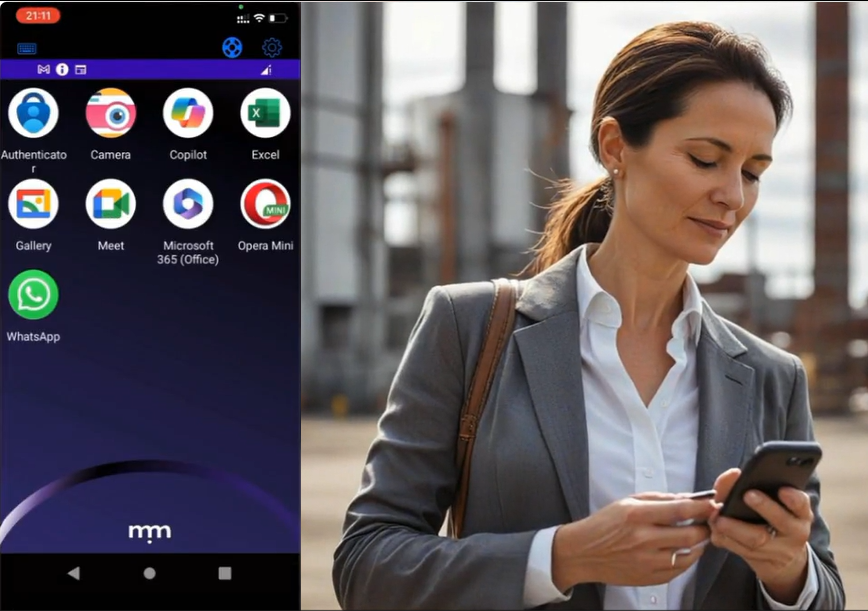
Once inside, Amy finds a familiar landscape. Her home screen displays icons for all her work-related apps, mirroring her desktop experience. This consolidation eliminates the need to juggle multiple apps and the risk of data leaks. It also provides Amy with seamless and intuitive continuity between the various work apps she constantly uses and her personal apps stored on her phone. And for non-technical users like Amy, the ease-of-use provided by Symmetrium means it’s as straightforward to use as her favorite apps. 

Seamless Communication: Staying Connected Within a Secure Environment

Symmetrium’s advanced features cater to Amy’s senior position, granting her the necessary permissions to handle classified information with ease. One of Symmetrium’s standout features is its secure camera function, which Amy accesses. She uses this to snap pictures of the classified documents, knowing they’re saved directly and securely to Tech Nova Pharma’s network, not her personal phone storage. This separation is crucial for maintaining data integrity and compliance.

Communication — both professional and personal — is seamless and separated thanks to Symmetrium. Amy can securely message coworkers and authorized contacts, just as she would with standard messaging apps. Whether it’s a quick WhatsApp to her colleague David Harris or joining a video call, every interaction stays within the protected Symmetrium environment.

Perhaps most impressively, Symmetrium achieves this level of security without compromising Amy’s personal use of her device. She can still receive messages from her mom asking for baby pictures, and Symmetrium ensures there’s no risk of mixing personal and professional data. This means there’s no risk of her sending baby pictures to her boss or confidential medical information to her mom.

Symmetrium: All-in-One Security Solution for Mobile Work

The app’s notification system keeps Amy informed of important work matters, even when she’s not logged in. This feature ensures she never misses critical updates while maintaining a healthy work-life balance.

For Tech Nova Pharma, Symmetrium offers peace of mind through its comprehensive logging of work activities. Every professional interaction is recorded, while personal activities remain private, striking the perfect balance between oversight and employee privacy.

Amy Can Now Focus On What She Does Best

Symmetrium has revolutionized how Amy manages her role as an in-field sales manager. By providing a secure, all-in-one solution for mobile work, it allows her to focus on what she does best — building relationships and driving sales for Tech Nova Pharma. Check out our product tour demo for Amy’s seamless experience as she uses Symmetrium while on the move and see how Symmetrium is setting new standards for mobile security and productivity.

Transform your mobile security experience today. Book a Symmetrium demo and see firsthand how effortless robust protection can be.


Why Humans are Your Biggest Vulnerability and What You Can Do About it

The significant and evolving security risks mobile devices pose when it comes to safeguarding sensitive corporate data are forcing organizations to constantly reassess their approach to mobile security. But while technology is evolving to try to minimize the threat, the human factor remains the weakest link for organizations. 

The numbers are alarming: the World Economic Forum’s “Global Risks Report 2022” shows a staggering 95% of cybersecurity breaches stem from human error. This isn’t just a statistic – it’s a harsh reality. Take the infamous 2017 Equifax breach, where a single employee’s failure to install a security patch exposed the personal information of over 143 million people.

As we integrate more advanced technologies into our lives, the human element in cybersecurity remains a critical vulnerability. Large language models like ChatGPT and deepfakes can be incredibly powerful tools, for example, but they can also be weaponized by attackers. These sophisticated techniques can create hyper-realistic phishing attempts, emails, or even videos that could potentially bypass even the most careful user.

When assessing the human threat it is important to consider the scale of the following vulnerabilities and how susceptible your organization is to them.

Vulnerability #1:  Lack of Awareness and Training

One of the primary reasons humans are a major security vulnerability is the lack of awareness and training. Employees often underestimate the importance of mobile security and are unaware of the risks associated with using their devices for work. This lack of knowledge leads to risky behaviors, such as downloading unverified apps, connecting to unsecured Wi-Fi networks, and failing to update software regularly.

Vulnerability #2: Social Engineering Attacks

Social engineering exploits our tendency to trust, and uses this to manipulate individuals into divulging confidential information or performing actions that compromise security. Phishing emails, fraudulent text messages, and fake apps are common tactics used by cybercriminals to exploit our innate trust and curiosity.

Vulnerability #3:  Weak Password Practices

Despite repeated warnings, weak password practices remain a common issue. Many employees use simple, easily guessable passwords or reuse the same passwords across multiple accounts. This practice makes it easier for attackers to gain access to sensitive data. Furthermore, the reluctance to use multi-factor authentication (MFA) exacerbates the problem, leaving accounts more vulnerable to unauthorized access.

Vulnerability #4:  Device Loss and Theft

When an employee loses a device, the data stored on it can easily fall into the wrong hands if the device is not adequately protected. Without proper encryption and remote wiping capabilities, the loss or theft of a mobile device can lead to severe data breaches.

Vulnerability #5:  Unauthorized Access and Usage

Employees sometimes share their devices with family members or colleagues without considering the security implications. This practice can lead to unauthorized access to corporate data and applications. Additionally, using personal devices for work purposes (BYOD) without proper security measures can expose corporate data to potential risks.

The Solution: Create a Walled Garden for Corporate Data  

Traditional security focuses on securing devices, but security can be compromised when data travels outside of the corporate network and comes to rest on mobile devices. Symmetrium creates a true zero-trust environment for your data, where no device is inherently trusted, and no data leaves the security of the corporate network. 

Here’s how it works:

  • Virtual Mobile Devices (VMDs): We transform regular mobile devices into secure extensions of your network. Imagine your phone becoming a secure window into your corporate environment.
  • Peer-to-Peer Encryption: Data stays within your network perimeter. Users access and view information through secure, encrypted streaming, eliminating the ability to download or store data on their devices.
  • No Data at Rest: Sensitive data never resides on the user’s device, significantly reducing the risk of breaches.

Separation of Personal and Work Data: Symmetrium automatically provides the complete separation between an employee’s personal data on their mobile device and work data, ensuring and maintaining their privacy.

A Seamless, Zero-Trust Approach to Mobile Security

Symmetrium integrates easily with an organization’s existing infrastructure to offer a smooth transition to a secure zero-trust environment without requiring a full technology overhaul. This is accomplished using virtual mobile devices (VMDs) that stay within the organization’s network perimeter. These use peer-to-peer encrypted streaming, enabling authorized users to securely access and view data, without transferring it to external devices. This innovative approach turns all mobile devices into secure virtual extensions of the organization’s network, ensuring compliance, security, and adherence to IT protocols.  Organizations can therefore maintain their current enterprise security protocols while protecting data and resources. 

In today’s world, data and employees are no longer confined to traditional offices. Symmetrium’s VMDs embody the true essence of zero-trust – robust security that empowers a mobile workforce while keeping data secure and safe.

Ready to secure your corporate data? Book a demo today!


How To Optimize Microsoft intune Using Symmetrium to Boost Security and Lower Costs

In today’s dynamic mobile cybersecurity landscape, where new threats are constantly and rapidly evolving, CISOs and security teams need to continuously focus on how best to fortify their defenses.

Organizations with existing Microsoft 365 and Azure subscriptions, often turn to Microsoft Intune to secure and manage all company-issued devices, as well as personal devices accessing work data through BYOD (Bring Your Own Device) programs. 

Intune enables Microsoft users to manage devices (phones, laptops, etc.) alongside other Microsoft services. Since Intune works within the Microsoft ecosystem, it can align well with an organization’s existing technology stack.


Managing The Cost and Complexity of Intune

While Intune offers several benefits such as device management, application management, and security policy enforcement, there are also some downsides to consider.

Cost: While Intune is part of Microsoft 365, it can be relatively expensive. The cost becomes more pronounced when scaling up the levels of protection.

Security: It is important to note that Intune provides the management layer, but implementing a defense layer requires an additional Mobile Threat Detection (MTD) solution. Microsoft’s MS Defender can fulfill this role but requires an additional payment on top of the cost of Intune.

Complexity in Setup and Management: The initial setup can be complex, while configuring conditional access, compliance settings, and application management requires a deep understanding of the platform. Intune also requires a separate setup for Android and iOS.

Limited Support for Non-Windows Devices: Although Intune supports iOS, Android, and macOS devices, its features are most comprehensive for Windows devices.

Dependency on Internet Connectivity: Being a cloud-based service, Intune requires consistent internet connectivity for management and policy enforcement.

While Microsoft Intune is a powerful tool for managing devices and protecting corporate data, it’s important for organizations to consider these potential downsides. Careful planning, clear policies, and ongoing management are key to mitigating these issues and making the most out of Intune.


Using Symmetrium with Intune Provides the Optimal, Cost-Effective and Efficient Mobile Security Solution

If you are considering using or currently have a subscription to Intune, to gain the full suite of security benefits you will need to pay extra money to get the full suite of protection. There’s another additional cost if you want to add Microsoft Defence. You’ll also pay extra to manage and secure WiFi connectivity. With Symmetrium you get the full capability from the get-go in one solution. You will never have to decide to add extra features and absorb the resulting additional costs.

Implementing mobile security can be daunting, resource intensive and costly. Symmetrium’s streamlined approach allows for the cost effective and efficient management of multiple devices, regardless of their brand or operating systems, from within Intune.


How Symmetium Optimizes Microsoft Intune

Enterprises using Intune don’t want the headache of managing additional tools and solutions. But by implementing Symmetrium they can quickly optimize the usage of Intune by treating Symmetrium just like any device in their Intune system. This means they can manage Symmetrium from within Intune to:

1) Maximize Security

Using Symmetrium in addition to Intune, instantly provides extra layers of security:

a. Web Protection — Symmetrium resides on a server within the organization network, which means organizations can uphold existing enterprise security protocols while effectively safeguarding data and resources. This enables security teams to manage the network from the server side, with no need for special tools to manage on the client/device side.

b. Malware Protection — With no data residing on mobile devices, there is no need to manage and protect the physical device.

c. Jailbreak Detection — Symmetrium can detect, analyze and block a jailbroken device before it makes a connection.

d. Network Protection — Symmetrium’s Virtual Mobile Devices (VMDs), which reside in the protection of the corporate IT infrastructure, uses the server network. The connection between the Symmetrium app and server is P2P encrypted.

e. Conditional Access — Symmetrium can easily be configured to provide conditional access. Any devices that try to connect that do not have access privileges will be instantly detected and blocked before they can make a connection. Symmetrium also provides extra conditional access, such as geolocation, device OS, and state.

2) Lower Costs

When using Symmetrium, organizations do not need a mobile threat defense (MTD) vendor, such as Microsoft Defender. This has several benefits.

– They don’t have to pay extra for security.

– MTD apps monitor threats by checking OS versions, system parameters, firmware, and device configurations. Symmetrium, however, stores all data in the cloud not on individual devices. This means it is not affected by threats at the device level.

– When an MTD detects an infected device that is integrated with Intune, the conditional access blocks email and managed apps, which affects the workflow. This scenario does not impact the usage of Symmetrium, because, unlike standard MDM and MTD solutions, the device itself holds no organizational data. So even if the device is infected with malware, the user can continue to work, because the data it accesses via Symmetrium will not be put at risk. In addition, Symmetrium validates if the hardware is jailbroken, rooted, using a custom ROM and can set the requirement for the minimum OS level.

3) Seamless Deployment and Management

Symmetrium allows Intune users to lower costs and improve security, all while using their existing settings and setup. This is because Symmetrium can be managed directly within Microsoft Intune. This means your IT team does not have to worry about using and configuring another management tool. They can use the same set of policies currently being used in Intune and simply treat Symmetrium as if they are managing a new device. It saves time and headaches as you already have a policy set up within Intune, so you can simply use it again.

They can use the same set of policies currently being used in Intune and simply treat Symmetrium as if they are managing a new device. It saves time and headaches as you already have a policy set up within Intune, so you can simply use it again.

Employee privacy is also strengthened using Symmetrium. If we compare standard devices managed by Intune, the user needs to install the agent, grant permission, install MTD, etc, directly on their device. With Symmetrium, the user only downloads the Symmetrium app to access the managed device.

Another important difference from Intune is that Symmetrium doesn’t need the client to be connected to update policy, apps, block access, etc. Whereas if you are using Intune you need an internet connection on the end-user device to get the update.


The Bottom Line: The Perfect Blend for Optimal Security, Cost Effectiveness and Seamless Management within InTune

To address the vulnerability of diverse endpoints and the inherent risk of exposing sensitive data outside the secure corporate network, Symmetrium’s unique approach transforms all mobile devices into secure virtual extensions of an organization’s network. And when blended with Microsoft Intune, it offers the optimal secure environment for the most cost-effective and resource-efficient solution for mobile security. So, when looking to balance the optimum solution in mobile security using Intune with the minimum TCO, Symmetrium provides the perfect match.

Discover how easy it is to lower the costs of your Intune mobile data protection while adding ease-of use to optimize your network security by booking a demo with Symmetrium here.

2023: The Year of Mobile Data Protection

The full-time return to office work has been declared dead. While this most likely has pleased most employees, Chief Security Officers (CSOs) and their teams will be less than ecstatic. They know remote working increases the possibility of security attacks and data breaches. And with the growing use of mobile expanding their attack surface, they are finding out firsthand that current solutions, relying on VPNs and user IDs, for example, are simply not enough. 

The resulting data breaches and attacks can be costly and damaging to organizations, exposing them to reputational damage and significant fines. Over 2023, the healthcare and financial sectors both paid a heavy price for data breaches. In fact, according to research by Proxyrack, the average cost of a data breach incident in healthcare is estimated at $9.23 million — the highest of any industry surveyed. The financial sector comes in second, with an average cost of $5.27 million.

Industries subject to rigorous regulation, like healthcare and finance, are encountering growing challenges with staff’s usage of applications, such as WhatsApp and Slack, for file sharing. This practice can violate stringent regulations pertaining to data confidentiality and security.

To tackle these growing concerns surrounding mobile data security, Symmetrium focused on upgrading its offering during 2023 to directly address and provide a solution to the security flaws CSOs were encountering.

Here are the standout highlights:

An Instant Messaging (IM) and SMS Data Protection Solution

With messaging apps now commonplace in the work environment, Symmetrium released its  unique IM and SMS suite. This innovation empowers organizations to promptly counter these security risks by implementing Virtual Mobile Devices (VDMs) within their network. 

Symmetrium’s VDMs offer users dedicated work mobile numbers, serving as unique identifiers, all without requiring separate physical devices. This shields employees against SMS phishing (Smishing), actively preventing fraudulent activities and malicious links by meticulously scanning every message. It seamlessly integrates with existing email security tools to ensure secure message delivery to end users. 

The solution also addresses compliance concerns by efficiently capturing and storing all work-related messages, establishing an agentless IM and SMS archive. This capability enables organizations to consistently meet the stringent regulatory data requirements imposed on their specific sector.

Creating a True Zero-Trust Solution to Reduce Attack-Surface Area

To limit the amount of touch points to public networks, Symmetrium delivered a cutting-edge zero-trust data mobile access solution. This facilitates productive collaboration while significantly reducing the attack-surface area and the chances of data breaches. 

To maintain a secure and private zero-trust environment for data, while minimizing external touch points to the internet, Symmetrium uses its groundbreaking VMDs. These reside within the organization’s network, so when accessed by employees remotely via their mobile phones or laptops, they serve as extensions of the company’s comprehensive security and compliance policies. 

By leveraging end-to-end encrypted streaming, these VMDs ensure a seamless, completely native mobile experience with effortless deployment and management. Sensitive data is accessed virtually and therefore at no time sits on the user’s actual device. The result is a true zero-trust environment, a radically reduced attack surface to ensure that data remains secure and is never put at risk.

Upgrading to Support 5G Networks to Deliver Security and Speed

During 2023, Symmetirum upgraded its streaming technology to support 5G networks. This uses AWS Wavelength Zones to enable organizations deploying Symmetrium’s high-performance Virtual Mobile Devices to benefit from a near real-time experience.

AWS Wavelength integrates the high bandwidth and ultralow latency capabilities of 5G networks with AWS compute and storage services. So, rather than using the public internet, AWS Wavelength Zones enable users to have a telco-grade connection between the cloud and the telco, and between the device and the telco. This shortens the overall time point-to-point, providing a super fast native experience for Symmetrium’s users.

Revolutionizing Zero-Trust Capabilities for Mobile Devices

In the quest for zero trust, Symmetrium’s provision of Virtual Mobile Devices functioning within the organization’s network perimeter, coupled with P2P encrypted streaming, guarantees data security without storing data on external devices. This innovative approach negates the necessity for extensive technological overhauls, enabling seamless integration of Symmetrium into existing infrastructure.

In 2024 Symmetrium will continue to empower organizations to confidently confront zero-trust challenges, facilitating a secure digital transformation. Organizations implementing Symmetrium will shield their data from both established and emerging security threats, including spyware, thereby enabling them to maintain a competitive edge in today’s dynamic landscape.

Safeguard your workspaces by establishing a genuine zero-trust environment for your mobile devices. Schedule a demo with Symmetrium today.

Navigating Compliance: Controlling IM Communications and Archiving in Highly Regulated Industries

With stringent oversight and the ever-evolving legislative landscape, organizations operating within highly regulated sectors face a unique set of challenges. One of the paramount considerations is managing how information is shared by employees and to ensure it is adherence to industry-specific regulations.

This has become a highly complicated management task, with Instant Messaging emerging as a highly popular communications tool to send and receive information within organizations. This is why controlled IM communications and archiving are now essential elements of compliance and risk mitigation.

Meeting the Needs of the Regulatory Maze

Highly regulated industries such as finance, healthcare, legal, and energy are no strangers to the intricate web of compliance requirements. Regulatory bodies such as the Securities and Exchange Commission (SEC), the Financial Industry Regulatory Authority (FINRA), the Health Insurance Portability and Accountability Act (HIPAA), and others wield substantial authority over these sectors. Non-compliance can result in severe penalties, including fines, legal actions, and reputational damage.

Within this context, the management of mobile electronic communications has come under intense scrutiny. Regulators require organizations to maintain and archive a comprehensive record of these communications. The rationale behind this is twofold: to ensure transparency and to facilitate investigations when necessary.

The IM Challenge

IM platforms enable swift decision-making, collaboration, and information sharing. However, their informal and unsanctioned nature poses unique challenges when it comes to compliance. Conversations happen quickly, often without the formality of emails, making them difficult to track and archive.

Furthermore, the use of personal devices for business communication, a common practice known as “Bring Your Own Device” (BYOD), complicates matters. In BYOD scenarios, distinguishing between personal and business-related communications becomes challenging, potentially exposing personal data to scrutiny during compliance audits.

In heavily regulated sectors, challenges arise when employees transmit files through applications, such as WhatsApp and Slack. These actions can result in data breaches and non-compliance with stringent regulations governing data confidentiality and security. Archiving these IM ‘conversations’ is infeasible despite regulatory requirements, due to technical and privacy challenges, forcing organizations to attempt to ban their use within the corporate environment.  

Difficulties Trying to Ban IM Communications 

Establishing and upholding a secure and compliant environment, with appropriate archiving, places a significant burden on organizations. This has left those who spearhead compliance policies struggling to control employees’ use of apps, such as Whatsapp, WeChat or TikTok, for work purposes. Indeed, the biggest concern for 61.5% of compliance leaders is “getting employees to comply with rules for electronic communication.” 

Even more concerning is that only 3% of compliance officers “strongly believe” banning messaging platforms is an effective method of ensuring compliant communications within their organization. This is even though the majority (59%) has enforced prohibitions on the use of social media and messaging apps as a response to heightened regulatory scrutiny.

Increasing Regulatory Pressure

However, despite the difficulties involved, regulators are increasing the pressure on organizations to demonstrate how they are monitoring and archiving data exchanged using messaging apps. 

The SEC, for example, has been taking a tough stance on major banks for their failure to monitor and archive their employees’ messages on unauthorized platforms. In December, the SEC imposed fines totaling $1.1 billion on Citigroup, Bank of America, and Goldman Sachs, following a $125 million penalty against J.P. Morgan Chase in December 2021.

The extent of the investigation into text messaging practices saw the SEC request firms to furnish their policies and procedures governing the use or prohibition of text messages and the retention of communications associated with brokerage or advisory services. Subsequently, the agency seeks documentation revealing the individuals responsible for supervising these messages, the methods employed for monitoring and training, as well as the mechanisms in place for detecting violations. 

Across all sectors that have to adhere to strict regulations, the use of messaging apps is presenting one of the biggest compliance challenges to confront organizations.

How Organizations Can Quickly and Cost Effectively Ensure Compliance

The paramount objective of regulation revolves around safeguarding data, necessitating the prevention of data from leaving and residing outside the corporate network. Symmetrium achieves this with the creation of Virtual Mobile Devices (VMDs) situated within the secure confines of an organization’s network. These VMDs seamlessly align with existing enterprise network and regulatory protocols, assuring the privacy and protection of all data. This proactive approach mitigates against the risk of substantial fines.

Symmetrium’s VMDs employ P2P encrypted streaming technology, enabling employees to access data through a designated portal on their personal devices. Importantly, this access is view-only, ensuring that the data never traverses beyond the secure organizational network and is never stored on external user devices. This robust security framework guarantees the continual safeguarding and compliance of sensitive data, with no data ever residing on devices external to the organization’s IT environment.

A Simplified and Streamlined Approach 

The outcome of implementing Symmetrium’s VMDs is a simplified and more streamlined approach to managing data. Regulatory officers and Chief Information Officers (CIOs) benefit from reduced complexity, as Symmetrium’s VMDs seamlessly extend existing compliance protocols. They are effortless to deploy and provide a native mobile experience, instantly ensuring compliance through customized end-to-end encrypted streaming, with no data stored at rest. Each mobile user is treated as an on-premises endpoint, granting control over when and where data can be accessed.

Symmetrium’s mobile access solution boasts minimal operational requirements while meeting stringent security compliance standards, seamlessly integrating with established data access protocols. The result is compliance simplified into a single, user-friendly app.

The need for controlled IM communications and archiving is paramount in highly regulated industries. Compliance is not merely a regulatory box to check; it’s a strategic imperative for risk management, security, and operational efficiency. Organizations that embrace these solutions not only meet their compliance obligations but also position themselves for success in an ever-changing regulatory landscape.

Isn’t it time you reevaluated your approach to meeting your regulatory requirements? Schedule a demonstration with Symmetrium today.

How to Protect Data When Mobile is the Biggest Threat to Corporate IT Security

The growth in BYOD policies and prevalence of hybrid work is seeing an increasing number of employees ditch traditional work devices in favor of personal ones. The result has seen cybercriminals shift their focus. They now see mobile devices as the soft underbelly of corporate IT networks and the perfect launchpad for their attacks. 

There are several reasons why hackers see personal mobile devices used in a corporate setting as an easy target. When managing these devices, mobile users frequently depend on the default security settings provided by manufacturers, as opposed to employing enhanced security software that is commonly deployed on their desktop computers.  Additionally, they often fail to regularly update their mobile operating systems, leaving their devices vulnerable to the latest malware and viruses. They also use a multitude of non-work-related apps, potentially exposing their device to being compromised. 

Cybercriminals have become adept at distributing malevolent APKs (Android application package files) through direct downloads and third-party app stores by masquerading unofficial versions of legitimate apps. By capitalizing on the familiarity of well-known app names, these malicious apps aim to infiltrate employee devices with malware. 

Highly regulated sectors, such as healthcare and finance, also face problems when employees send files via apps such as WhatsApp and Slack. These can be responsible for data leaks and contravene strict regulations surrounding the confidentiality and security of data. 


Lack of Adequate Security Protection for Mobile Devices

Despite these threats and the widespread implementation of BYOD (Bring Your Own Device) policies, there is still a glaring lack of adequate mobile security protection in most organizations. And this should make every CSO shudder given the results of research carried out by SlashNext

  • 71% of employees store sensitive work passwords on their personal phone
  • 66% of employees sometimes use their personal texting apps for work use
  • 59% of employees sometimes use their personal private messaging apps for work use.

Unsurprisingly, a growing number of CSOs are finding out the hard way that mobile devices represent one of the most vulnerable endpoint in their organization. But why, in an era where mobile device management (MDM) solutions enable administrators to control, secure and enforce policies on phones, tablets and other endpoints, is mobile still seen by hackers as highly exploitable?

The problem is that mobile presents a security threat that is bigger than the sum of its parts — beyond emails, calendars or messaging apps — because mobile devices interact with numerous systems, networks and enterprise data. Their escalating use in the workplace therefore means an ever-escalating array of devices, endpoints and identities. This means they require an entire set of resources to continuously secure, protect and manage their usage that few organizations have the resources or solutions to fully implement. 


The Achilles Heel Mobile Device Management (MDM)

The key flaw of MDM solutions revolves around their primary goal — to enable the centralized management of all endpoint devices and users. This approach encompasses various tools like mobile application management (MAM) and identity and access management capabilities. But focusing on managing devices and identity management is not enough. Employees have multiple identities — for email, WhatsApp, Slack, etc — and CSOs can fall into the false belief that by securing these various IDs, they in turn protect devices and data. But the Achilles heel with these solutions is that they, again, focus on securing devices and users — not data.

So, once users are granted access to the corporate IT network, the data they interact with on their mobile is stored on that device. Consequently, the data is no longer confined within the secure corporate network environment and is left exposed and vulnerable on the device it now resides on. Hackers exploit this by targeting individual employees who have access to confidential information on their mobile device, rather than exploiting a technical vulnerability


Addressing the Risks Posed by Remote Access 

The ultimate goal of security has to focus on protecting data and therefore needs to stop data from leaving and coming to rest outside of the corporate network. This is precisely where Symmetrium, a cutting-edge zero-trust data mobile access solution, steps in, facilitating productive collaboration while significantly reducing the chances of data breaches. This innovative solution effectively transforms any mobile device, be it managed or unmanaged, into a virtual extension of the organization’s network, complete with compliance, security, and IT protocols.

To maintain a secure and private zero-trust environment for data, Symmetrium offers a groundbreaking solution through its virtual mobile devices (VMDs). These virtual devices, residing within the organization’s network, serve as extensions of the company’s comprehensive security and compliance policies when accessed remotely by employees via their mobile phones or laptops. Leveraging end-to-end encrypted streaming, these VMDs ensure a seamless, completely native mobile experience with effortless deployment and management. Sensitive data is accessed virtually and therefore at no time sits on the user’s actual device. The result is that data remains secure and is never put at risk.

With Symmetrium at their disposal, organizations gain unparalleled control over the data accessed by their employees through mobile devices, ensuring robust protection against potential risks. The convenience of a centralized management console allows for efficient management of diverse devices, regardless of their brand or operating system, all while minimizing resource allocation.


Seamlessly Meeting Security and GRC Protocols

The seamless integration of Symmetrium effortlessly aligns with existing security and GRC (Governance, Risk, and Compliance) protocols, united under a single application. As a result, organizations can rest assured, knowing that their data remains safeguarded and secure, regardless of the device utilized for access, because Symmetrium: 

  1. Enforces strict network policies for seamless protection of sensitive data and compliance with regulations.
  2. Ensures Compatibility with various hardware and software configurations on multiple devices.
  3. Mitigates the risk of data breaches, malware attacks, and unauthorized access.
  4. Requires minimal resource allocation, optimizing efficiency.
  5. Delivers centralized management through a user-friendly console.
  6. Enables employees to utilize personal devices while maintaining their experience and privacy.
  7. Ensures a highly cost-effective solution, eliminating the need for device purchasing, maintenance, or upgrades.

Symmetrium’s streamlined approach empowers organizations to maintain unwavering data security, bolstering data governance, and fortifying against potential vulnerabilities with confidence.

Discover how easy it is to tame the threat of mobile security by booking a demo with Symmetrium here.

How to Overcome the Problems Achieving HIPAA Compliance for Mobile Devices

Implementing and maintaining a secure and compliant HIPAA environment places a heavy burden on healthcare organizations, with current solutions failing to consistently meet the strict regulatory requirements. Symmetrium’s compliant-by-design mobile device management solution is now a game changer, ensuring HIPAA compliance through the use of a single, low maintenance application. 

The use of mobile devices has become a staple feature of every healthcare environment. But while they are transforming patient care, the security risks mobile devices pose to confidential patient information is a growing risk. This is why access to healthcare data via mobile devices has been specifically targeted by the Health Insurance Portability and Accountability Act (HIPAA), a federal law requiring the creation of national standards to protect sensitive patient health information from being disclosed.


Challenges Involved in Protecting ePHI

HIPAA protects electronic protected health information (ePHI) that is produced, saved, transferred or received in an electronic form. Every entity that has access to ePHI needs to be compliant to HIPAA rules. This applies to doctors, nurses, clinics, pharmacies, insurance companies and anyone accessing ePHI — they all need to be compliant. 

HIPAA states: “Healthcare providers, other covered entities, and business associates may use mobile devices to access electronic protected health information (ePHI) as long as appropriate physical, administrative, and technical safeguards are in place to protect the confidentiality, integrity, and availability of the ePHI on the mobile device and appropriate BAAs [Business Associate Agreements] are in place with any third-party service providers for the device and/or the cloud that will have access to e-PHI.”

However, staff mobility, remote employees, third-party contractors and BYOD policies are just a few of the reasons implementing adequate security and compliance solutions to meet HIPAA requirements is increasingly difficult. 


Vulnerabilities in Current Solutions 

With a heavy burden placed on the healthcare sector to be HIPAA compliant, the first line of defense is to ensure devices include the necessary safeguards to guarantee against theft and data loss through the use of a robust layer of security.
HIPAA regulations also require that ePHI data must be encrypted when transmitted over a network. The most popular way of doing this is to create a VPN through which VDIs (virtual desktop infrastructure) can connect to the data, therefore negating the need for it to be encrypted. This however raises problems.

Usage can be limited because a user needs to make sure no one else is using the VDI. This means they have limited flexibility and can be more difficult to scale as needed. This can be a problem for organizations with fluctuating user numbers or those looking to implement a bring-your-own-device (BYOD) policy. There are also security concerns as users operating in a VDI environment can as easily click on a malicious link in an email or on a web page as someone using a physical desktop. 

VDIs also require a heavy level of management and maintenance, which places a heavy burden for qualified IT staff where ongoing training and staff turnover can become problematic. To comply with HIPAA data encryption and data wiping tools may also need to be implemented and maintained. This can add to the management burden. 


Achieving HIPAA Compliance with One Solution

HIPAA compliance can be achieved using only one solution. Symmetrium is HIPAA compliant by design for mobile devices. Symmetrium creates virtual mobile devices (VMDs) that reside within the protected perimeter of a healthcare organization’s network and thus adhere to all existing enterprise network and HIPAA security protocols. This ensures that ePHI data is kept private and protected, avoiding security breaches and massive fines.

Symmetrium VMDs use P2P encrypted streaming, which allows healthcare workers to view ePHI data via a portal using their own devices. This view-only access means ePHI data never leaves the protected organizational network and therefore is never transferred to a user’s external device. This ensures the data at all times remains secure and compliant, never coming to rest on devices outside of the protected organizational IT environment.

The result is an easier life for regulatory officers and CIOs thanks to the less complicated management of ePHI data, because:

  1. Symmetrium’s VMDs become a virtual extension of all existing HIPAA compliance protocols, are seamless to deploy and offer a native mobile experience.

  2. They immediately ensure HIPAA compliance in BYOD environments using custom end-to-end encrypted streaming with no ePHI data at rest. This means that each mobile user is treated as an on-prem endpoint, which they can control when and where users can access ePHI data.

  3. Symmetrium’s minimum-resources mobile access solution needs very light operational requirements and delivers high security compliance demands that integrate smoothly into existing data access protocols. The result is HIPAA compliance using one single app. 


Isn’t it time you reconsidered your approach to meeting HIPAA requirements? Book a demo with Symmetrium here.

SEC Issues Over $2bn in Fines to Crack Down on Use of WhatsApp and Other Messaging Apps

With financial institutions struggling to meet their regulatory obligations regarding messaging apps, the sector could have saved billions of dollars by using Symmetrium to minimize their exposure.

When JPMorgan was hit with $200 million in SEC fines in Dec 2021, for letting employees use WhatsApp, it should have been a warning sign. Less than a year later, the US Securities and Exchange Commission (SEC) struck again, fining 16 Wall Street firms $1.8B for using private text apps

This avalanche of fines was imposed on banks and financial institutions for allowing employees to discuss business via unapproved and unmonitored messaging systems, such as WhatsApp. Such discussions are legally required to be recorded, stored and available to government authorities to review when required.

The sector has been cracking down heavily on the use of unsecured messaging apps for business. In 2020, for example, a senior credit trader at JPMorgan was suspended for communicating via WhatsApp with colleagues at Jefferies, KPMG, and VTB Capital. 


Financial Institutions Struggling to Meet Regulatory Requirements

With the pervasive use of mobile phones as hybrid work policies become more normal, the exposure firms face has risen sharply since the time when only email was being used. All email messages could be stored and archived on corporate email servers to meet regulatory requirements, but now with BYOD (Bring Your Own Device) policies and the widespread use of messaging apps, banks are struggling to meet SEC requirements. 

WhatsApp remains the most popular messaging app, but more than a half dozen others are regularly used, such as Facebook Messenger, iMessage, WeChat and Telegram. Their prevalence is giving Compliance Officers at financial services firms sleepless nights as workplace smartphones and BYOD policies create a perfect storm for users to intentionally or even accidentally breach SEC rules. 


How The Sector Could Have Avoided Billion-Dollar Fines

Sharing data using unauthorized messaging apps and personal email accounts not only flouts SEC regulations but can also expose sensitive data to security risks. Symmetrium’s zero trust mobile access solution has been specifically designed to help organizations operating in highly regulated sectors to remain compliant by keeping data protected, particularly in BYOD environments. 

Symmetrium is device agnostic, and works by the creation of virtual mobile devices (VMDs) within the organization’s own IT environment. These VMDs sit within this protected environment and when remotely accessed these virtual devices act as extensions of all organizational security and compliance policies using end-to-end encrypted streaming. So when messaging using Symmetrium’s mobile access solution, all regulatory obligations are adhered to in this highly controlled environment. The result is a completely secure, compliant and native mobile experience with seamless deployment and management.


Ensuring All Data Remains SEC Compliant

With messages sent by authorized users virtually accessing Symmetrium via the organizational network, the messages and any associated data never sits on the user’s actual device. The result is that data remains secure and archived to meet SECs requirements.

Each mobile device acts as an on-prem laptop, allowing for full control over employee messaging to shield financial institutions from any risks associated with using messaging apps, such as WhatsApp. 

This allows for minimum-resources mobile messaging management via a central management console for all devices, OS and brands. All is integrated smoothly into existing security and GRC data access protocols through one single app. The result is organizations can finally be confident their data and messaging remains secure and compliant at all times, avoiding crippling fines and potential data breaches. 

Discover how Symmetrium can keep your data and employee messaging compliant by booking a demo here.


close-tag

We’re proud to be the ones making TPRO, CISO, IT and vendors - happy

by ramping up zero-trust mobile access.

Explore all use cases now